


Why does one skin in CS2 cost $3 and another $3,000, even though they look almost identical? The answer is in CS2 skin float values and rare patterns. Most CS2 players are still confused about floats, patterns, and how they all affect the price of skins. The Blix team analyzed common player questions on Reddit and other platforms.
This guide explains when float is critical, which patterns are valuable, and where to look for the best deals. If you want to stop losing money on trades—or finally understand why your Battle-Scarred AWP is worth pocket change—this article is your best starting point.
Contents
- 1 CS2 Float Explained: Wear Rating, Visuals, and Value
- 2 How Float Works in CS2: From Case Drop to Wear Tier
- 3 CS2 Float Values and Wear Tiers (0.00–1.00)
- 4 CS2 Wear Tiers Explained: Factory New to Battle-Scarred
- 5 How to Check Float in CS2: In-Game, Steam, and Extensions
- 6 CS2 Pattern IDs Explained: What They Change and Why They Matter
- 7 Rare CS2 Patterns That Add Value: Blue Gem, Max Red, and More
- 8 How Float and Patterns Change CS2 Skin Prices
- 9 General Pricing Trends: Low Float, High Demand, Higher Prices
- 10 Exceptions: When High Float Can Be More Valuable
- 11 Why Rare Patterns Increase Value (And When Hype Takes Over)
- 12 CS2 Float and Pattern FAQ
CS2 Float Explained: Wear Rating, Visuals, and Value

Float in CS2 is a numerical indicator of the skin’s wear, ranging from 0.00 (new) to 1.00 (heavily worn). Each skin is assigned a random float within its allowed range. It determines how worn the skin looks.
Float affects the price: skins with lower float are often more expensive, especially for popular models (e.g., AK-47 | Redline 0.06 will be more expensive than the same skin with float 0.40). Float cannot be changed; it is fixed when you get the skin.
How Float Works in CS2: From Case Drop to Wear Tier

When you open a case and receive a skin, it is automatically assigned a random value from 0.00 (best condition) to 1.00 (maximum wear). This number determines which wear category the skin belongs to. Not every skin can roll the full 1.00 range. Each skin has hidden minimum and maximum float caps, which is why some finishes can never exist in Factory New or Battle-Scarred.
| Wear Category | Float Range | Visual Impact | Typical Price Trend |
|---|---|---|---|
| Factory New | 0.00 – 0.07 | Bright, clean, no scuffs | $$$ |
| Minimal Wear | 0.07 – 0.15 | Minor scuffs, vibrant colors | $$ |
| Field-Tested | 0.15 – 0.38 | Noticeable scratches | $ |
| Well-Worn | 0.38 – 0.45 | Faded, heavy wear | $ |
| Battle-Scarred | 0.45 – 1.00 | Damaged, scratched | $ |
Don’t just chase Factory New. Some Battle-Scarred skins (like the “Black Asiimov”) have unique visual appeal and collector value!
Two skins with the same wear (e.g., Field-Tested) may look different if one has a float closer to 0.16 and the other to 0.37.
If you decide to sell skins, please see the article: How to Sell CS2 Skins for Real Money?
CS2 Float Values and Wear Tiers (0.00–1.00)
Float determines how worn the skin is, affecting the amount of scratches, scuffs, and overall texture quality. However, the effect of float varies depending on the skin model and its texture.
For most skins, a low float (closer to 0) means few scratches, bright colors, and sharp details. For example, AK-47 | Redline with float 0.05 looks almost new with minimal scuffs.
We have a selection of skins for different weapons: Top 10 Pink Skins in CS2: The Most Stunning Picks for 2025.
However, some skins don’t gain many visible scratches at higher floats; instead, they darken or fade, keeping the structure but changing brightness. For example, M4A1-S | Guardian — at high float, the skin becomes noticeably darker, but there are almost no scratches. AK-47 | Slate — at higher floats, it mainly gets darker rather than showing heavy edge wear.
In some cases, a higher-float skin can look cleaner than a lower-float one, depending on the finish and pattern. Float is a wear number, but pattern and texture affect skin appearance.
For example, Case Hardened AK-47 — a skin with a float of 0.80 may have less visible scratches if the pattern has more blue areas (Blue Gem) than a skin with a float of 0.20 with a primarily silver finish and scratches.
If you don't know how to build an inventory cheap and tasteful, our article will help you: Best Cheap Skins in CS2: Budget Loadout for Under $50.
CS2 Wear Tiers Explained: Factory New to Battle-Scarred
In this section, you’ll find CS2 skin condition explained clearly, from Factory New to Battle-Scarred, so you know exactly what to expect in terms of wear and visual quality.
Factory New: 0.00–0.07

As the name suggests, Factory New is the most pristine condition available. These skins look the cleanest in-game. Any wear is minimal and usually hard to notice. The surface of such skins is clean, colors are bright, and textures and lines are visible.
Minimal Wear: 0.07 – 0.15

The weapon looks almost like new, but upon close inspection, you may notice slight scuffs. The damage here is minor, most often on the corners and edges of the weapon. The skin looks a little less bright, but it still looks very good.
Field-Tested: 0.15 – 0.38

This is a mid-wear condition. Scuffs and scratches are visible in noticeable areas. Sometimes the color may be less intense. The skin may look duller, but the pattern is still distinguishable.
Well-Worn: 0.38 – 0.45

This weapon looks like it has been used heavily, so you can see some obvious scuffs; some of the pattern may be obliterated. The skin itself usually looks dull. But such skins are suitable for their price.
You can often find one that still looks cool, but you’ll buy the skin for a reasonable price. For example, the community thinks that the AK-47 | Redline, AWP | Asiimov skins look much better with this kind of wear and tear.
Battle-Scarred: 0.45 – 1.00

The name speaks for itself. Severely damaged skin with lots of battle scratches and scuffs. Some skins, such as AK-47 | Wasteland Rebel or M249 | Gator Mesh, may appear rusty. Sometimes, there is a feeling that the weapon looks dirty or stained.
The patterns are usually obliterated. But, for example, in the Five-SeveN | Hyper Beast skin, even with such wear and tear, the monster’s pattern is almost intact. Or in AK-47 | Fire Serpent, the snake is preserved.
You might also want to take a closer look at the gloves: Top 10 Best CS2 Gloves in 2025: Must-Have Picks for Every Player.
How to Check Float in CS2: In-Game, Steam, and Extensions
If you’re wondering how to check CS2 float values quickly, both in-game and with browser extensions, this guide will walk you through the best methods.
Check Float In-Game: Inspect Screen Method

We’ve created step-by-step instructions for you to make it as clear as possible:
- Open CS2.
- Go to your Inventory.
- Right-click on the skin of interest.
- Select Inspect.
- On the inspect screen, locate the information icon (the letter “i” inside a circle) at the bottom. Hover over or click on this icon to display the “Wear Rating,” which is your skin’s float value.
Check Float on Steam: Best Extensions and Tools
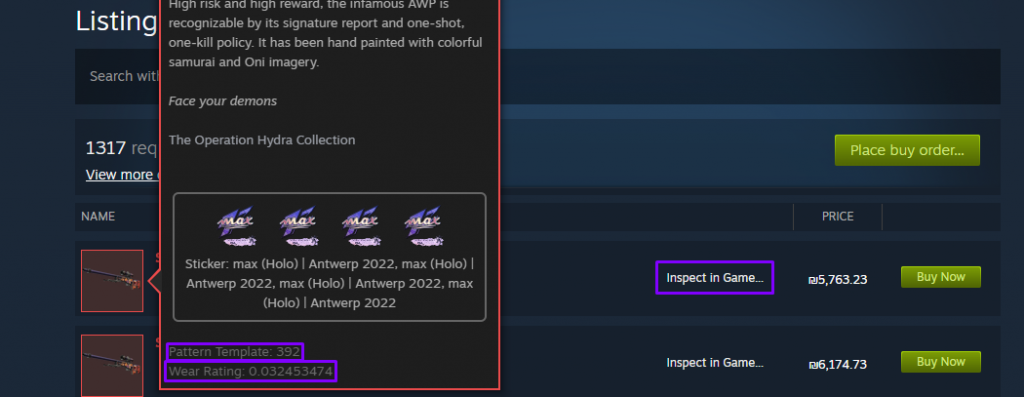
For skins that are not in your inventory, such as those in the Steam Marketplace, external tools can help you determine float values. To verify someone else’s skin, you will need to get a verification link:
- On the Steam Marketplace, search for the skin you’re interested in.
- Click on the listing and select “Inspect in Game…”.
- Copy the URL that appears.
You can install one of the popular extensions for more convenience. For example, popular ones are:
These automatically add float values and patterns directly to your Steam inventory or marketplace. It allows you to quickly check skins from other players, trades, or in your inventory.
CS2 Pattern IDs Explained: What They Change and Why They Matter

Every CS2 skin has a unique pattern ID, ranging from 0 to 999. In this CS2 pattern ID guide, we explain how these IDs affect appearance and price.
How it works:
- Each skin has a pattern ID, which is between 0 and 999.
- It determines which part of the texture will be “stretched” on the weapon model.
- The same skin (e.g, AK-47 | Case Hardened) can look different because of different patterns.
- Some patterns are popular and rare; because of this, they cost more.
Pattern value is usually judged based on the playside of the weapon—the side visible during normal gameplay—rather than the back or inspect-only angles.
Rare CS2 Patterns That Add Value: Blue Gem, Max Red, and More
Blue Gem (Case Hardened): What Collectors Pay For

- Skins from the Case Hardened series (e.g., AK-47, Karambit, Five-Seven) have a texture made up of patches of blue, gold, and purple. The more blue you see, the rarer and more valuable the skin tends to be.
- The rarest are skins where almost the entire surface is pure blue. They are called Blue Gem.
AK-47 | Case Hardened has other desirable pattern seeds besides #661. Value is mainly driven by how much blue appears on the visible side of the rifle, and some collectors track specific “blue gem” seeds—one example is Pattern #387, which is documented as showing strong blue coverage (including an almost fully blue barrel) on the AK-47.
Max Red (Slaughter): High-Value Red Coverage and Shapes

Slaughter skins (such as knives) have a texture of red and gray elements with different shapes – zigzags, hearts, etc. The rarest patterns show a large area of bright red color or distinct shapes.
“Max Red” is a pattern with maximum coverage of red, with no gray ‘interference’.
- Patterns with shapes (heart, angel, dog) are also appreciated, such as:
“Heart” pattern – ~#59, #25, #34, etc. (but can vary).
- Rare patterns also include, for example, Kitty (a pattern resembling a cat’s face) and Phoenix (a bird-shaped pattern perceived as a phoenix).
Other Rare Patterns: What to Look For Beyond Case Hardened

Rare patterns also exist on some finishes, but they aren’t grouped into clean number ranges. Each skin rolls a pattern seed (“Pattern” number), and only certain specific seeds create the most desirable looks.
- AWP | PAW – collectors pay more for seeds where the gold cat/gem elements appear cleanly and visibly positioned (for example, close to centered).
- Glock-18 | Moonrise – the most sought-after seeds are the ones where the moon (and star shapes) appear prominently, with the moon looking clearly centered.
- Galil AR | Sandstorm – higher-value seeds are the ones with a more symmetrical, dense-looking distribution of sand patches.
If you want exact “rare seed” numbers for each skin, use a dedicated pattern database or seed list, since the premium patterns are documented as specific seeds, not broad ranges.
How Float and Patterns Change CS2 Skin Prices

General Pricing Trends: Low Float, High Demand, Higher Prices
Skins with smaller float values look newer and are therefore highly valued. All values up to 0.07 are usually the most expensive. The same system works with patterns. If the pattern is rare, such a skin will cost a lot, but the price will fall if it is not unusual.
Rare floats and patterns can command higher prices, but they often have lower liquidity, meaning they may take longer to sell compared to standard variants.
Skins with higher float values tend to have more scratches and damage, resulting in a lower cost. The cheapest ones tend to be Battle-Scarred. However, some high float skins have a unique appearance that increases their value.
Exceptions: When High Float Can Be More Valuable

In CS2, most skins are valued higher the lower the float. However, there are exceptions when a high float makes a skin unique, visually unusual, or rare.
- AWP | Asiimov. At float ~0.9, the “Black Asiimov” effect appears – the paint is heavily peeling, especially on the muzzle. The cost of such a skin can be higher than MW or FT, if the skin is aesthetically pleasing.
- AK-47 | Redline. High float gives a more matte, duller look, which many people like. BS versions with stickers are exciting, as the skin “fades” while the stickers remain bright.
- Five-SeveN | Monkey Business – the worn ones look like “rotten bananas” – funny effect.
- P90 | Death by Kitty – high float gives a vintage, “time washed” look.
- MP9 | Food Chain – at float 0.9+, the skin looks surreal.
Take a look at the article: These 10 Five-Seven Skins in CS2 Will Make Your Loadout Look Insane!
Why Rare Patterns Increase Value (And When Hype Takes Over)
Some patterns appear very rarely. For example, we talked about the Case Hardened Blue Gem. It has thousands of variations, but only a small fraction contains bright blue spots.
Other patterns, like symmetrical patterns, interesting shapes, and clean or bright colors, look more visually pleasing. That’s why you pay more for them – they look cool in-game and on screenshots.
Sometimes, specific patterns become popular because streamers, memes, or events temporarily raise the price. Some collectors collect other patterns, creating artificial scarcity that raises prices.
CS2 Float and Pattern FAQ
Are There Any Skins Where Float Matters Less?
Yes. For some skins, float has little to no visible impact because the finish is very simple or uniform. Examples include Vanilla knife finishes and flat-color skins like Glock-18 | Candy Apple or Nova | Sand Dune, where wear changes are minimal to the eye.
Is it Possible to Change Float or Pattern?
No. Float and pattern are rigidly fixed at skin creation (drop, craft, contract). They cannot be changed without changing the skin itself.
Does the Skin Wear Out Over Time?
No. The skin in CS2 does not wear out with use. If you get Factory New, it stays that way forever.
Why Does the Same Skin With Different Float Cost 10 Times More?
Because the appearance changes a lot. Example: AK-47 | Redline with float 0.10 (Minimal Wear) looks almost new and costs ~$25. The same skin with float 0.44 (Well-Worn) is shabby and costs ~$5.
Where is the Best Place to Sell Skins With Rare Patterns?
Common options include third-party marketplaces and trader communities. Steam Market lacks proper float and pattern filters, so rare value is often overlooked by buyers.
