


CS2 (Counter-Strike 2) skin trading in 2026 is bigger than ever—and for many players, it’s no longer “just cosmetics.” With certain skins worth hundreds or even thousands of dollars, trading has become a serious market where one mistake can cost you your inventory.
If you’re swapping skins to build your dream loadout or trying to trade up for profit, this guide breaks down how CS2 skin trading works, what actually drives prices, and the step-by-step safety checks you should follow to avoid scams and bad trades.
Contents
- 1 How CS2 Skin Trading Works (Basics Explained)
- 2 How to Trade CS2 Skins on Steam: Step-by-Step (2026)
- 3 Step 1: Open Your Steam Profile
- 4 Step 2: Access Your Inventory
- 5 Step 3: Go to Trade Offers
- 6 Step 4: Get or Share Your Trade Link
- 7 Step 5: Initiate a Trade with a Friend
- 8 Step 6: Select Items to Trade
- 9 Step 7: Review and Add Requested Items
- 10 Step 8: Confirm the Offer
- 11 Step 9: Approve the Trade via Steam Guard
- 12 What Determines the Value of CS2 Skins in 2026?
- 13 CS2 Skin Rarity Tiers Explained
- 14 Float Value and Wear: How Condition Affects Price
- 15 Pattern Variations and Rare Patterns
- 16 Stickers and Customization
- 17 StatTrak™ Skins: How Kill Counters Affect Price
- 18 Step-by-Step Guide to Safe CS2 Skin Trading
- 19 Step 1: Secure Your Steam Account
- 20 Step 2: Verify Your Trade Partner
- 21 Step 3: Always Use the Official Steam Trade Interface
- 22 Step 4: Double-Check the Trade Offer Details
- 23 Step 5: Avoid the Most Common CS2 Scams
- 24 Step 6: Use Reputable Trading Platforms (If Not Using Steam)
- 25 Where to Trade CS2 Skins in 2026: Safe Third-Party Options
- 26 Types of CS2 Trading Sites Explained
- 27 How to Tell if a CS2 Trading Site Is Safe
- 28 Conclusion: Trade Smarter and Protect Your Inventory
- 29 CS2 Skin Trading FAQs
- 30 Is CS2 skin trading legal?
- 31 Can Steam recover lost skins?
- 32 What if I get scammed?
- 33 What’s the safest way to trade high-value items?
How CS2 Skin Trading Works (Basics Explained)
CS2 skins can be traded directly with other players through the official Steam trading interface. Each player selects items from their own inventory to exchange. Trades can be done privately between friends or publicly using trade URLs. The goal for many traders is to buy low and sell high, but others simply want to upgrade their cosmetics.

Trading works by offering your items and receiving items of equal or greater value. Steam’s built-in system ensures transparency and includes safety features like Steam Guard. All trades are confirmed through your Steam client or mobile app, reducing the risk of scams when used correctly.
If you’re aiming to build a visually striking loadout, check out our guide to the best red CS2 inventory skins, which highlights top red-themed weapons, knives, and finishes favored by collectors and traders.
How to Trade CS2 Skins on Steam: Step-by-Step (2026)
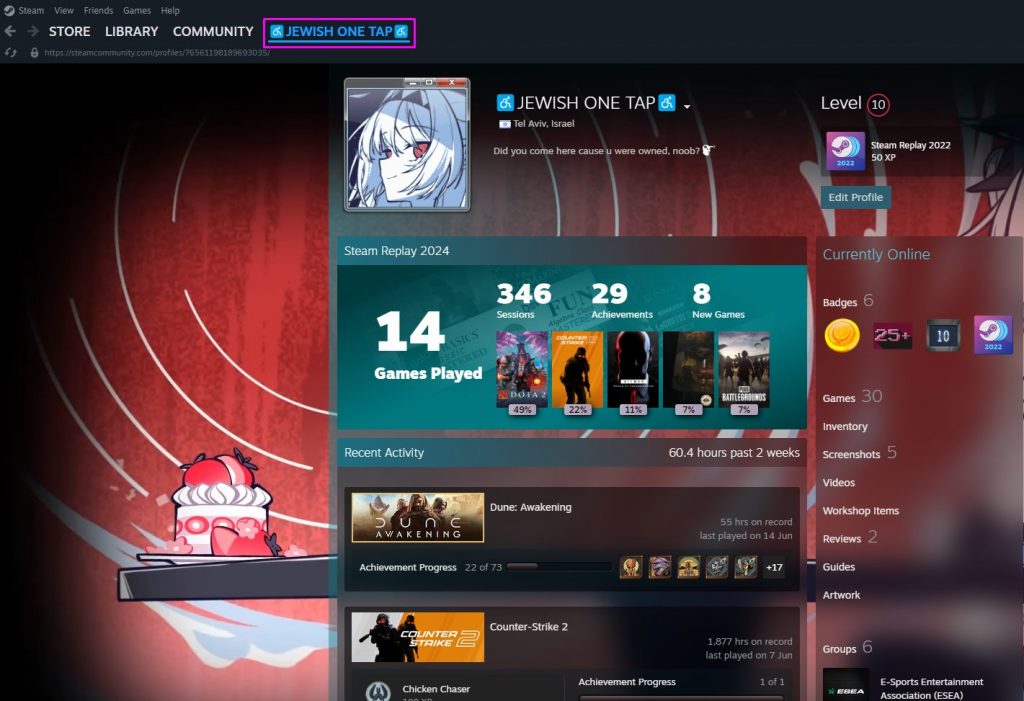
Step 1: Open Your Steam Profile
Log in to your Steam account and click your username in the top bar. Then select “Profile.”
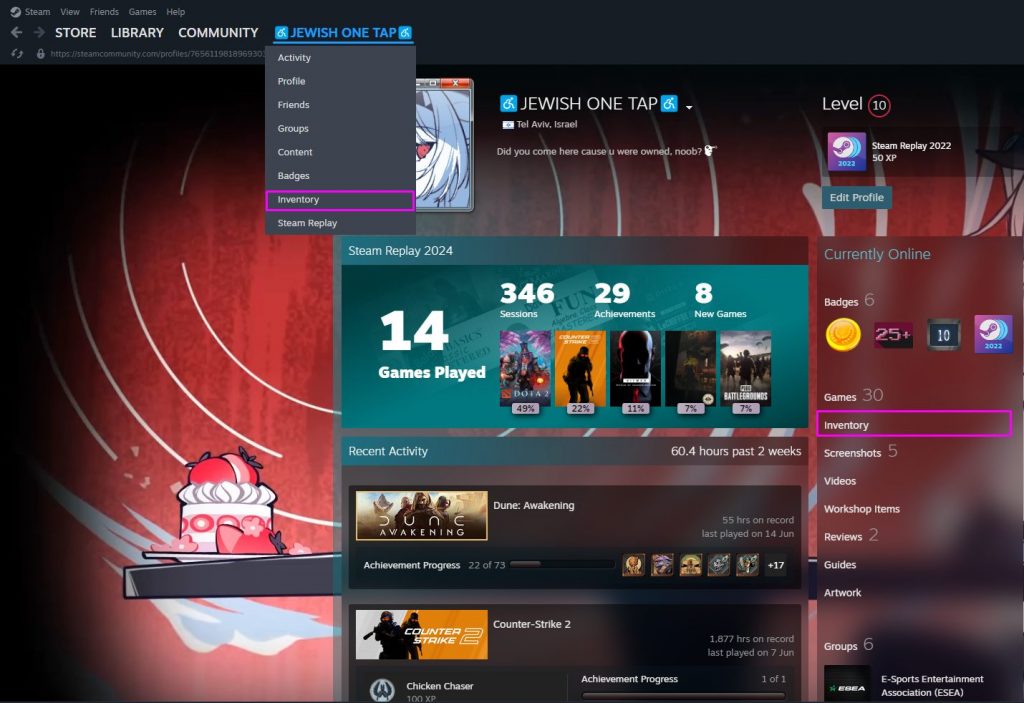
Step 2: Access Your Inventory
On your profile page, click the “Inventory” tab. This displays all your CS2 skins and other Steam items.
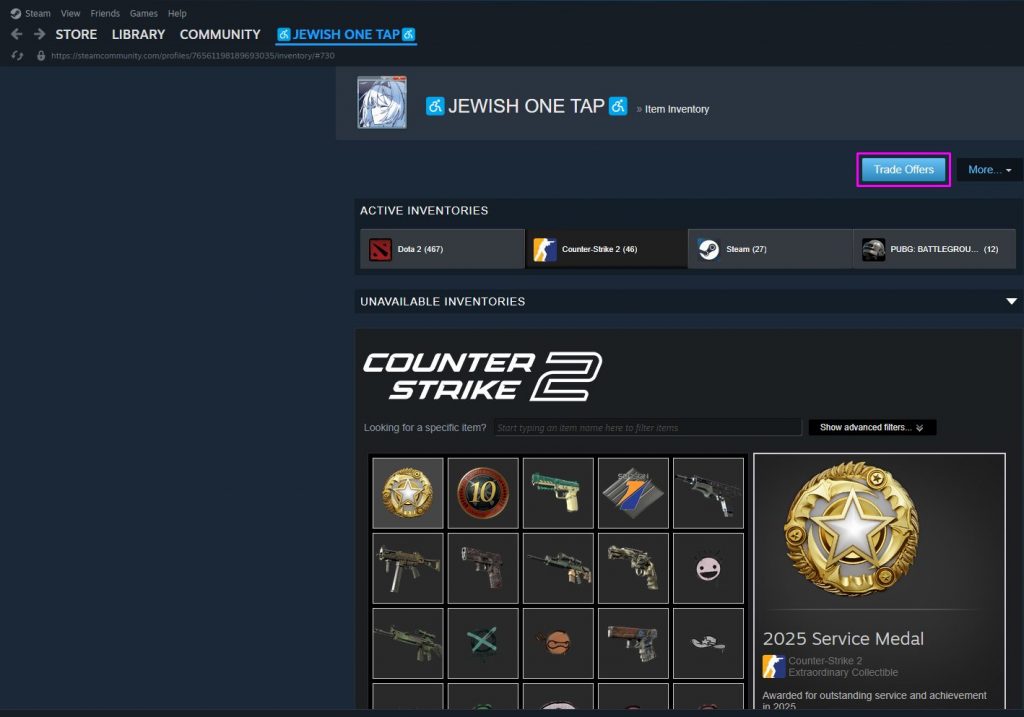
Step 3: Go to Trade Offers
Inside your inventory, locate and click the “Trade Offers” button in the right-hand menu.
Click on “Who can send me Trade Offers?” Here, you’ll find your personal trade URL. You can copy this to share it or paste someone else’s link to start a trade.
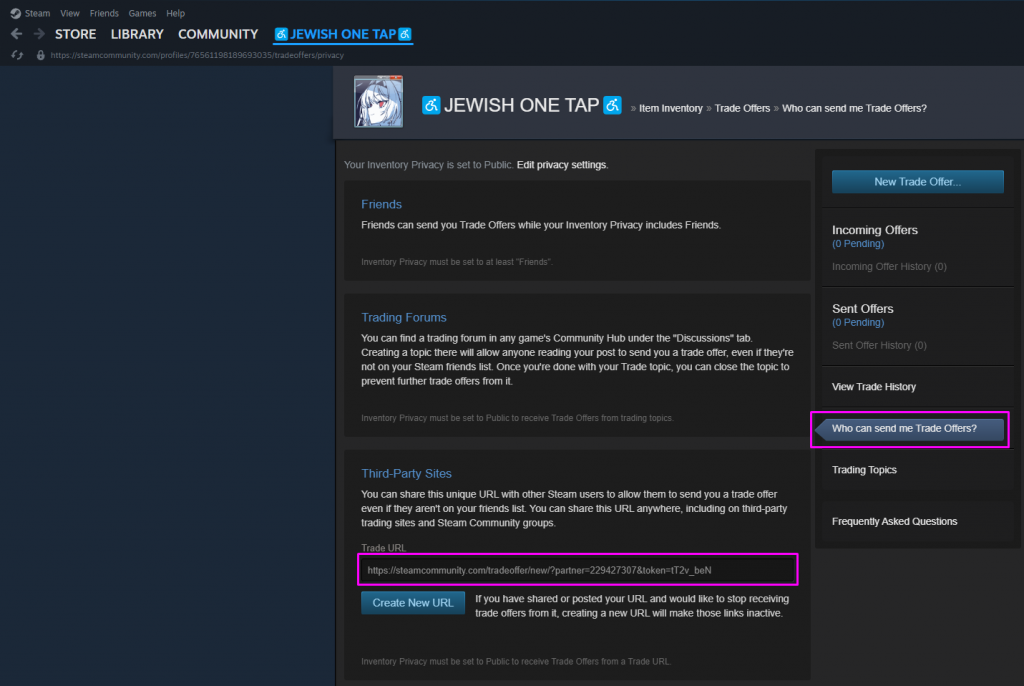
Step 5: Initiate a Trade with a Friend
If the person is already your Steam friend, click “New Trade Offer…” from the Trade Offers page and choose their name.
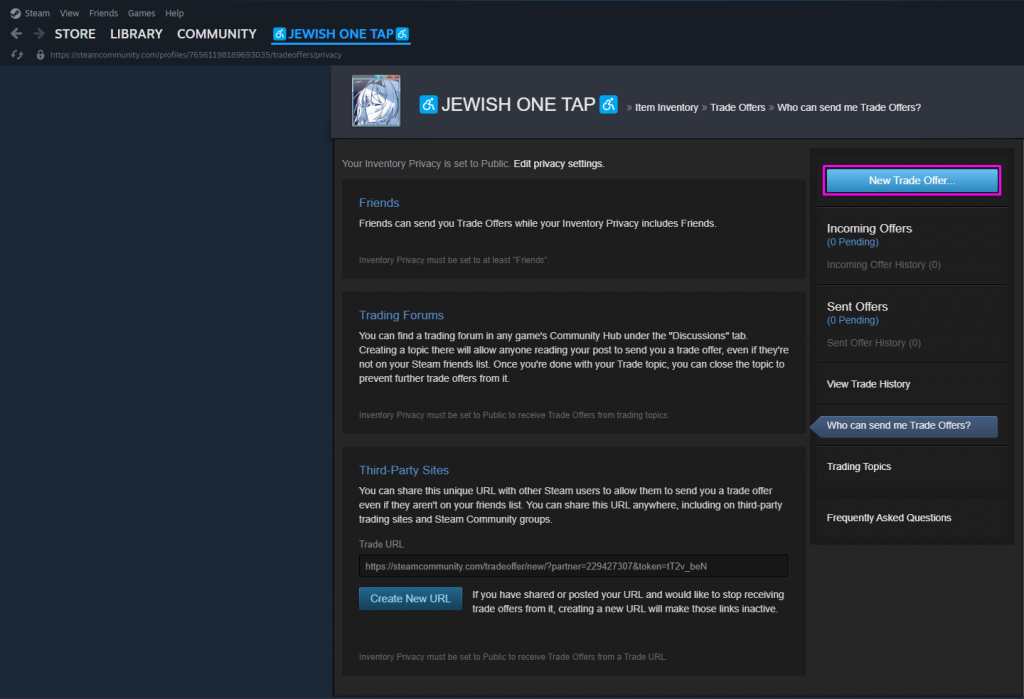
Step 6: Select Items to Trade
A trade window will open. Choose the skins or items you want to offer from your inventory. Click each item to add it to the trade box.
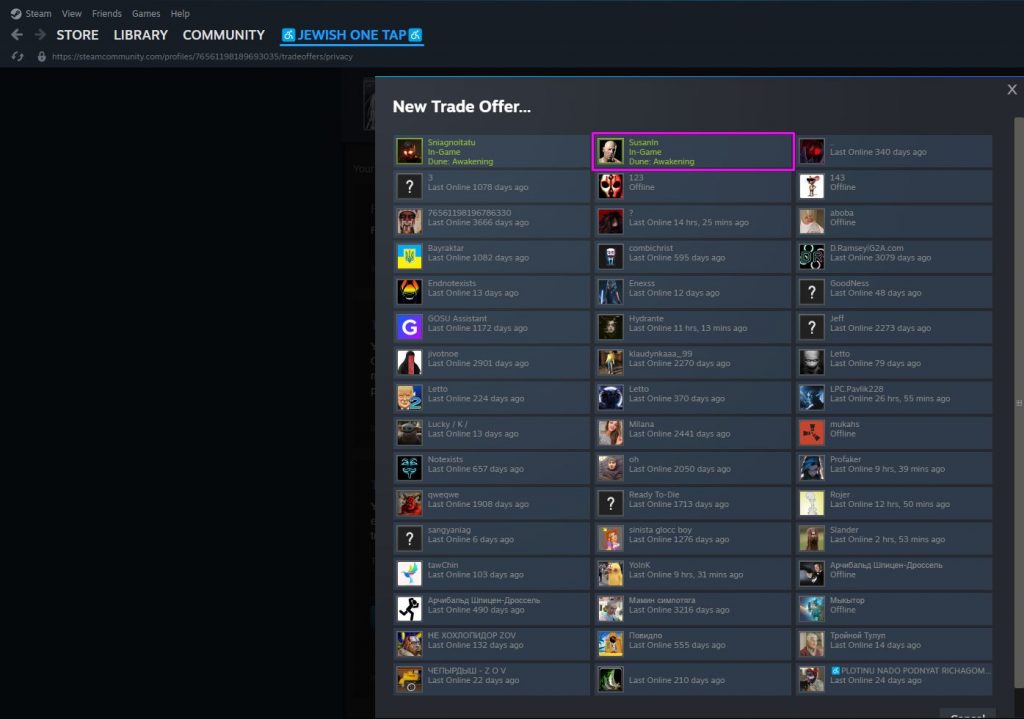
Step 7: Review and Add Requested Items
Next, select the items you want from the other user’s inventory. Double-check each item’s name, float value, and any stickers before proceeding.
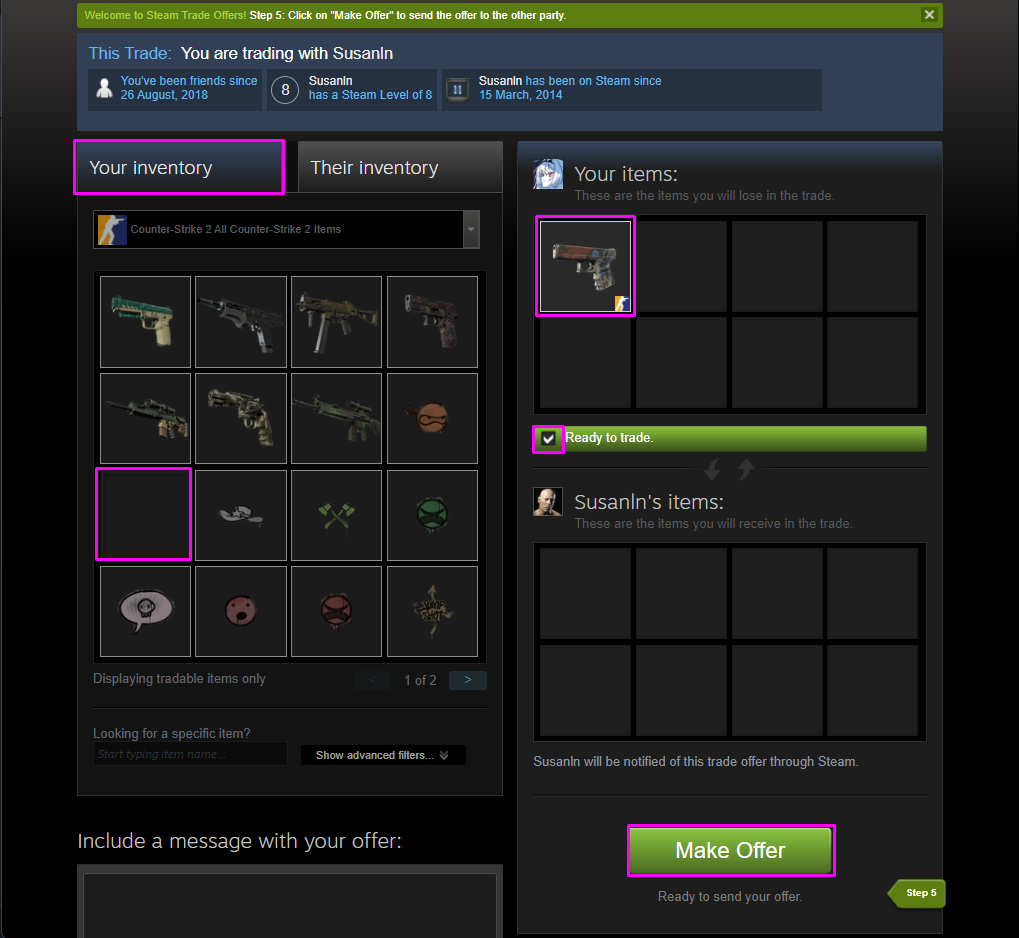
Step 8: Confirm the Offer
Click the “Ready to Trade” checkbox, then hit “Make Offer.” This sends the trade proposal to the other person.
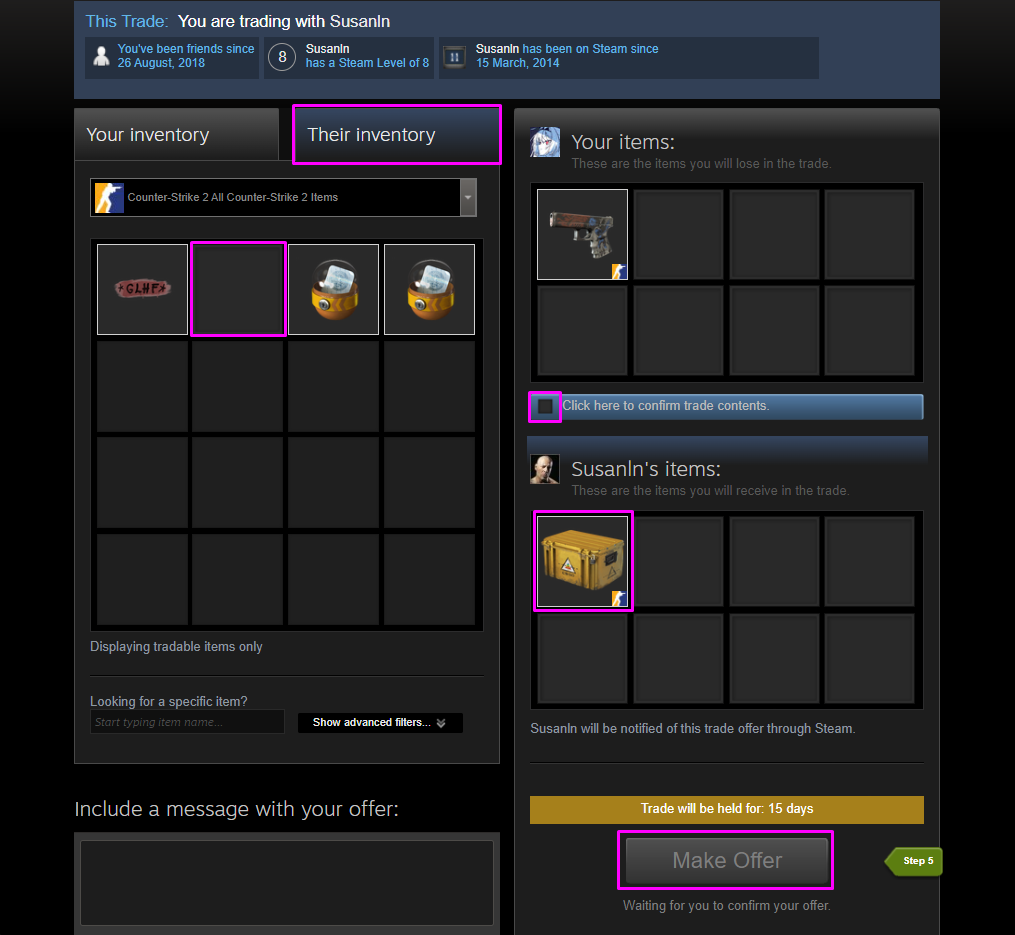
Step 9: Approve the Trade via Steam Guard
If you have the Steam Mobile Authenticator, you’ll need to approve the trade offer through the app. This adds a layer of security to prevent unauthorized trades.
What Determines the Value of CS2 Skins in 2026?
The value of a CS2 skin depends on several factors that influence rarity, appearance, and market demand. Some skins can rise in value over time—making them popular both for collectors and traders looking to profit. Here’s a breakdown of what impacts the price of skins:
CS2 Skin Rarity Tiers Explained

Each CS2 skin belongs to a rarity tier, which determines how often it drops from a case or is found in-game. The rarer the tier, the higher the market value—especially for popular weapon types.
| Rarity Tier | Color Code | Description |
|---|---|---|
| Consumer Grade | White | Very common |
| Industrial Grade | Light Blue | Uncommon |
| Mil-Spec Grade | Blue | Rare |
| Restricted | Purple | Mythical-tier skins |
| Classified | Pink | High-tier skins |
| Covert | Red | Ultra-rare (e.g. AK, AWP) |
| Contraband | Gold | M4A4 | Howl |
Float Value and Wear: How Condition Affects Price

Float value is a decimal between 0.00 and 1.00 that determines how worn a skin appears.
| Float Range | Wear Level | Description |
|---|---|---|
| 0.00 – 0.07 | Factory New | Pristine, minimal or no wear |
| 0.07 – 0.15 | Minimal Wear | Very light wear |
| 0.15 – 0.38 | Field-Tested | Noticeable wear but still clean |
| 0.38 – 0.45 | Well-Worn | Significant visible wear |
| 0.45 – 1.00 | Battle-Scarred | Heavily worn and scratched |
Some skins like the AK-47 | Redline show minimal visual difference between wear levels, so float matters more in high-end trades.
To learn how to check float value in CS2 and why it matters for pricing, see Blix’s CS2 Skin Float Value & Patterns: What Affects Price? article.
Pattern Variations and Rare Patterns

Certain CS2 skins—especially knives and gloves—have randomized pattern templates. This means two skins with the same name can look completely different.
Example: a case hardened knife with a lot of blue can be a “Blue Gem,” which can be worth thousands more than the same knife with a mostly gold pattern.
Stickers and Customization

Another improvement for CS2 skins is stickers that can be applied to weapons. Stickers have their own Rarity, too. The most expensive stickers are those from old Majors and tournaments, which only increase in value over time.
Applied stickers also affect the price of the skin. Sticker value depends on more than just rarity. Placement, condition, and if a sticker has been scraped all affect price.
StatTrak™ Skins: How Kill Counters Affect Price

StatTrak™ skins track the number of confirmed kills. These are more expensive than regular versions of the same skin—especially if they have a good float or rare pattern.
- StatTrak count is stored on the skin itself and typically persists when traded.
- StatTrak cannot be added or removed after the skin is unboxed or traded.
- StatTrak can be reset by transferring kills to another skin using a StatTrak Swap Tool.
Step-by-Step Guide to Safe CS2 Skin Trading
Trading in CS2 can be profitable and fun—but only if you protect yourself from scams and mistakes. Follow these proven steps to keep your inventory and account safe in 2026:
Step 1: Secure Your Steam Account
- Enable Steam Guard: Use the Steam Mobile Authenticator for added security.
- Use a strong, unique password: Avoid reusing passwords across platforms.
- Activate Two-Factor Authentication (2FA): Protect your login from phishing attacks.
Without Steam Guard, Steam may place a trade hold (up to 15 days) after new logins/devices or security changes, so enable it before you start trading.
Step 2: Verify Your Trade Partner
Before sending or accepting a trade offer:
- Check the user’s profile level and playtime
- Ensure their inventory is public
- Avoid accounts that are newly created or empty
Hidden inventories, no friends, and generic avatars often signal scam accounts.
Step 3: Always Use the Official Steam Trade Interface
Only trade through Steam’s built-in system—never on Discord, Telegram, or through unsolicited links.
- Avoid clicking random trade links from strangers.
- Never log into “Steam replica” sites—many are phishing pages.
Steam introduced Trade Protection in 2025, adding an extra safety layer for certain CS2 item trades. When a trade is Trade Protected, it may be reversible for a limited time (commonly up to 7 days). This is designed to reduce the impact of hijacks and some scam scenarios by giving you a short window to undo a bad trade.
Step 4: Double-Check the Trade Offer Details
Scammers often try last-second item switches or duplicate name tricks.
- Carefully inspect item names, stickers, and float values
- Re-check your selected items and theirs before clicking “Make Offer.”
- Use browser extensions like Steam Inventory Helper to enhance visibility
Step 5: Avoid the Most Common CS2 Scams
Here are the scams to look out for in 2026:
| Scam Type | Description |
|---|---|
| Fake Middlemen | Scammers pretend to be trusted traders or moderators. Valve doesn’t use middlemen. |
| Impersonators | Check Steam IDs, not just usernames. Many scammers clone real profiles. |
| Phishing Links | URLs disguised as legit sites trick users into giving up credentials. |
| Fake Buff/Float Screenshots | Never trust screenshots—verify floats and patterns yourself. |
For high-value trades, consider recording your screen as proof.
Step 6: Use Reputable Trading Platforms (If Not Using Steam)
If you use a third-party site, ensure it has:
- A strong reputation in the community
- Escrow systems to prevent instant scams
- Verified user reviews and active moderation
You can use CS.MONEY site, as it is among the trusted platforms in 2026. Always double-check the domain—scammers create clones of popular trading sites.
Where to Trade CS2 Skins in 2026: Safe Third-Party Options
While Steam’s built-in system is secure, many traders use third-party sites for better selection, faster trades, or potential profit margins. However, not all sites are created equal—some are riddled with scams and impersonators.
Here’s what you need to know about trading outside Steam in 2026.
Types of CS2 Trading Sites Explained
There are two main types of CS2 trading sites:
Bot-Powered Trading Sites (Instant Swaps)
These platforms, like CS.MONEY, use automated bots to exchange items with you quickly, usually at a fixed quote based on their pricing model.
Pros:
- Fast and simple interface
- Instant trades
- Real-time market pricing
Best for: quick swaps, convenience, and speed.
Peer-to-Peer (P2P) CS2 Trading
These platforms connect you with other users. Trades are usually manual (or partially assisted), and pricing can vary depending on negotiation and demand.
Pros:
- Potentially better deals than instant swaps
- More flexibility for collectors and niche items
- Better for negotiating sticker crafts, patterns, and high-end items
Safety tip: Only use P2P platforms that provide escrow protection (items are held until both sides confirm), have clear dispute handling, and strong anti-scam measures. Avoid direct “off-site” agreements or middlemen.
How to Tell if a CS2 Trading Site Is Safe
Before using any trading site, check for:
| Trust Factor | What to Look For |
|---|---|
| HTTPS & Domain | Always use sites with SSL encryption (https) and correct domain spelling |
| Escrow Protection | Site holds items until both sides confirm the trade |
| Community Reputation | Reddit, YouTube, and Trustpilot reviews |
| Clear Fees & Policies | Hidden fees = red flag. Reputable sites show them up front. |
| Customer Support | 24/7 live chat or response times under 24h |
Beware of clone sites (e.g.cs-money[.]shop) — scammers copy real URLs with minor changes.
If you're unsure which items are currently hot, take a look at our Best CS2 Cases to Open in 2026 to discover which cases offer the most valuable and desirable skins right now.
Conclusion: Trade Smarter and Protect Your Inventory
Trading CS2 skins can be exciting—whether you’re collecting, customizing your loadout, or turning profits. But with real money on the line, safety is non-negotiable.
To recap:
- Use Steam’s official system for security.
- Double-check trades to avoid scams or last-minute item switches.
- Only trade on reputable third-party sites with escrow and good community feedback.
- Understand what makes skins valuable—float, pattern, rarity, and demand all matter.
Don’t rush. When in doubt, verify. One careful trade is better than one regrettable scam.
CS2 Skin Trading FAQs
Is CS2 skin trading legal?
Yes, you can trade skins in CS2 via Steam’s official system and other reputable third-party platforms.
Can Steam recover lost skins?
In general, Steam Support does not restore items lost through scams, trades, Market transactions, deletions, or gifting. However, CS2 supports Steam Trade Protection, which can let you reverse recent trades during a 7-day window (only for Trade Protected items/trades).
What if I get scammed?
Take the following steps:
- Secure your account: change password, check email security, revoke unknown devices, and scan for malware.
- Report the scammer via their Steam profile and submit a Steam Support report with any relevant evidence.
- Check Trade Protection status: if the trade is protected, act inside the reversal window.
Recovery is still uncommon, so prevention matters most.
What’s the safest way to trade high-value items?
Use Steam trades with Steam Guard Mobile Authenticator and verify every item before confirming.
- Prefer Trade Protected trades when available (so you keep the reversal window).
- Record your screen for high-value trades as a personal proof trail.
- Avoid middlemen and off-platform “verification” trades—Steam does not use middlemen.
