

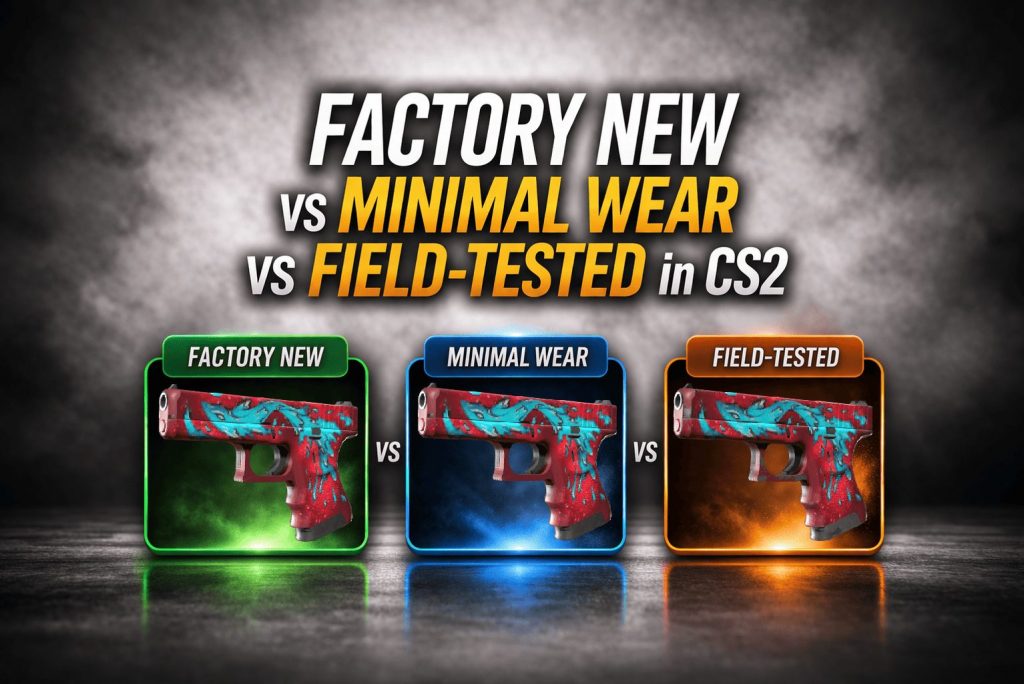

Factory New vs Minimal Wear vs Field-Tested in CS2 comes down to one thing: float value, which controls how clean (or worn) a skin looks. In most cases, Minimal Wear is the best value-for-money, while Factory New is worth it only when you care about the cleanest look or premium pricing. Field-Tested is the budget pick, but you should inspect the exact skin because wear can vary a lot at the same tier.
In this guide, you’ll learn the float ranges for each wear tier, how they usually look in-game, and how to choose the best option for your budget and resale goals.
If you want a deeper breakdown of pricing logic, check out this guide on how CS2 skin prices work.
Contents
- 1 CS2 Wear Tiers Explained: What “Factory New,” “Minimal Wear,” and “Field-Tested” Mean
- 2 How CS2 skin wear is determined by float value
- 3 CS2 float ranges for FN vs MW vs FT
- 4 Why two skins in the same wear tier can look different (float within the tier)
- 5 Factory New in CS2: Visual Quality, Float Targets, and When to Pay the Premium
- 6 Factory New float range and “best-looking” target floats
- 7 When Factory New is visibly better than Minimal Wear
- 8 When Factory New is not worth it (skins with subtle wear differences)
- 9 Minimal Wear in CS2: The “Sweet Spot” for Price vs Looks
- 10 Minimal Wear float range and “looks like FN” MW floats
- 11 When Minimal Wear looks identical to Factory New (practical checkpoints)
- 12 Minimal Wear trading considerations vs Factory New
- 13 Field-Tested in CS2: Budget-Friendly Wear Tier with Big Float Variation
- 14 Field-Tested float range and why “clean FT” matters
- 15 What low-float Field-Tested looks like vs high-float Field-Tested
- 16 Field-Tested red flags: finishes where FT wear is very noticeable
- 17 Factory New vs Minimal Wear vs Field-Tested in CS2: Side-by-Side Comparison Checklist
- 18 CS2 inspect checklist: where to look for wear (edges, scratches, pattern hotspots)
- 19 “Same wear tier, different look” checklist (finish-dependent wear)
- 20 “Buy by float, not label” rule for smarter purchases
- 21 CS2 Buying Guide: Which Wear Tier to Choose Based on Your Goal
- 22 Best wear tier for collectors and long-term holders
- 23 Best wear tier for traders and liquidity
- 24 Best wear tier for tight budgets (how to avoid ugly FT)
- 25 CS2 Float Basics: How to Check Float Value Before You Buy
- 26 How to check float on Steam/inspect links
- 27 Float target ranges to bookmark (FN/MW/FT “good floats”)
- 28 Common float traps: overpaying for FN or buying high-float FT accidentally
- 29 Common Mistakes When Choosing Factory New vs Minimal Wear vs Field-Tested in CS2
- 30 Paying FN premium when low-float MW looks the same
- 31 Ignoring FT float spread (clean FT vs rough FT)
- 32 Forgetting skin-specific wear behavior and float caps
- 33 FAQ: Factory New vs Minimal Wear vs Field-Tested in CS2
- 34 Does a CS2 skin get worse with use over time?
- 35 Can Minimal Wear ever look better than Factory New?
- 36 Is Field-Tested always “bad-looking”?
- 37 What float should I aim for in Minimal Wear and Field-Tested?
CS2 Wear Tiers Explained: What “Factory New,” “Minimal Wear,” and “Field-Tested” Mean
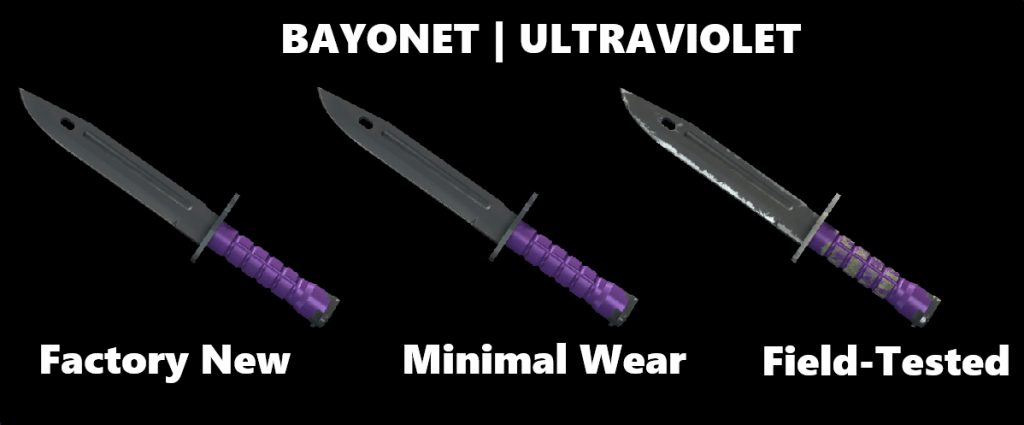
Every skin has a hidden float value, and that number is what actually determines how worn the skin looks. The wear tier you see is just a simplified category based on that float.
How CS2 skin wear is determined by float value
Each skin in CS2 has a float value between 0.00 and 1.00.
- Lower float = cleaner skin
- Higher float = more visible wear
For example, a skin with a float of 0.02 will look almost perfect, while a skin with a float of 0.35 will have noticeable scratches and fading.
This system is why two skins with the same name and condition can still look different. The float is what actually controls the visual quality.
CS2 float ranges for FN vs MW vs FT
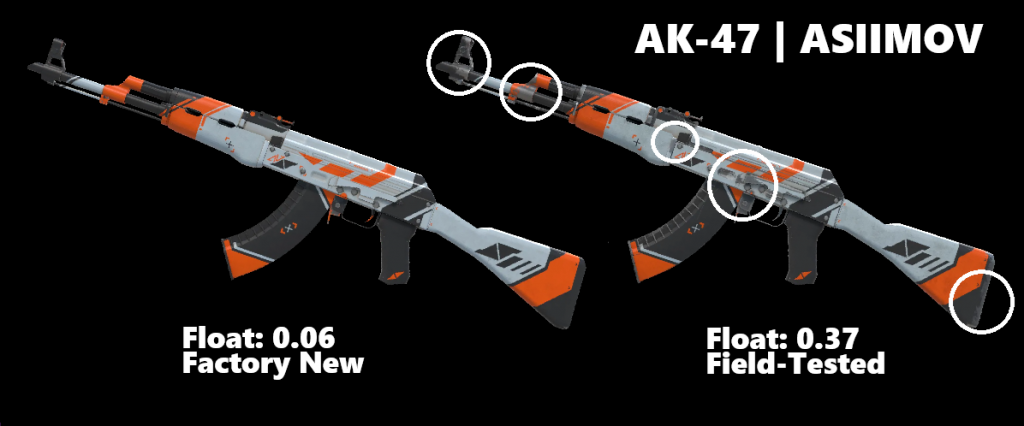
Each wear tier covers a specific float range:
- Factory New (FN): 0.00 – 0.07
- Minimal Wear (MW): 0.07 – 0.15
- Field-Tested (FT): 0.15 – 0.38
These ranges define the label, but they do not guarantee how the skin looks inside that tier.
A 0.07 Minimal Wear skin can look almost identical to Factory New, while a 0.15 Minimal Wear skin can look closer to Field-Tested.
To understand how float and patterns affect value, read this breakdown of what impacts CS2 skin prices.
Why two skins in the same wear tier can look different (float within the tier)
Not all skins within the same wear tier look the same because float still varies inside the range.
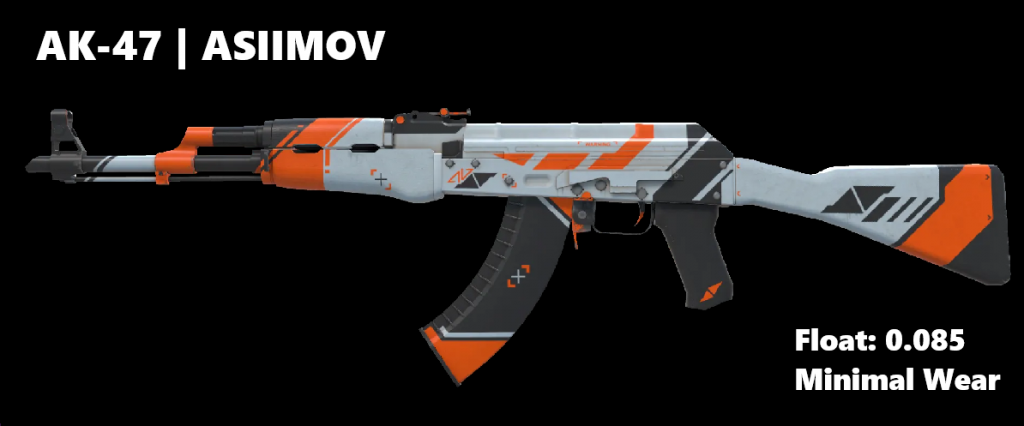
- A 0.08 Minimal Wear skin will usually look very clean
- A 0.14 Minimal Wear skin can show visible wear
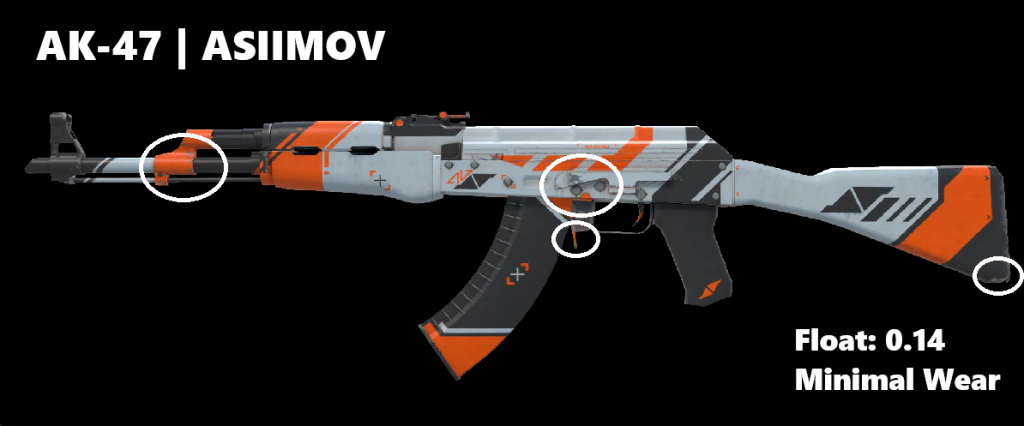
Both are labeled Minimal Wear, but the difference is noticeable.
This is why experienced buyers focus on float, not just the wear label. The label tells you the category, but the float tells you what you’re actually getting.
Some skins also show wear differently. Bright or detailed finishes tend to show scratches more clearly, while darker or simpler skins can hide wear even at higher floats.
Factory New in CS2: Visual Quality, Float Targets, and When to Pay the Premium
Factory New is the condition most buyers look at first. It is the cleanest wear tier in CS2, usually the most attractive version of a skin, and almost always the most expensive. On paper, that sounds like the obvious best option. In practice, it depends on the skin and on how much extra you are paying.
For some skins, Factory New really does look better and feels worth the premium. For others, the jump from a strong Minimal Wear listing is so small that most players will never notice it in a match.
Factory New float range and “best-looking” target floats
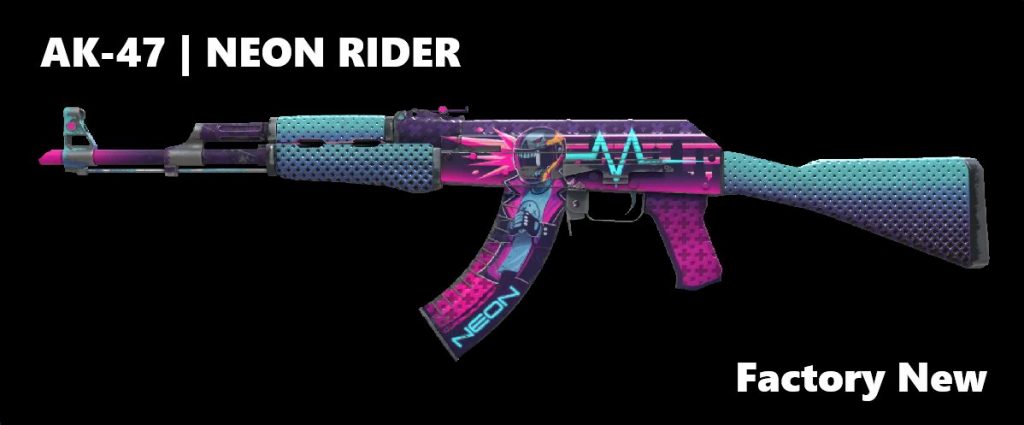
In general, the best-looking Factory New skins are usually in the 0.00 to 0.03 range. Once you move higher inside FN, the skin is still clean, but tiny flaws can start to show on finishes that reveal wear easily. That difference is not always dramatic, but on expensive skins it can matter.
When Factory New is visibly better than Minimal Wear
Factory New makes the most sense on skins where wear shows up clearly. Bright finishes, glossy surfaces, and designs with large clean areas tend to look better in FN because scratches and fading stand out more once the float climbs.
This is also where the premium can make sense. If a skin loses part of its appeal as soon as it leaves Factory New, paying more for the cleaner version is easier to justify. The same goes for high-end knives, rare finishes, and skins bought for collecting instead of just playing.
In those cases, Factory New is not just a status pick. It can be the version that actually preserves the look people want.
When Factory New is not worth it (skins with subtle wear differences)
Factory New is much less appealing when the visual gap over Minimal Wear is tiny. A lot of skins still look excellent in low-float MW, especially darker finishes, textured designs, and patterns that hide wear well.
That is where many buyers save money. Instead of paying a large premium for the FN label, they buy a clean Minimal Wear version that looks almost the same in-game. For regular players, that is often the smarter move.
The main point is simple: Factory New is worth paying for when the condition change is easy to see. If the skin still looks great in low-float Minimal Wear, the premium is often hard to justify.
Minimal Wear in CS2: The “Sweet Spot” for Price vs Looks
Minimal Wear is where most experienced CS2 buyers end up. It offers a strong balance between appearance and price, and in many cases, it gives you a skin that looks almost like Factory New without paying the full premium.
That’s why Minimal Wear is often called the “sweet spot.” You avoid the biggest price jump in the market while still getting a clean, high-quality look.
Minimal Wear float range and “looks like FN” MW floats
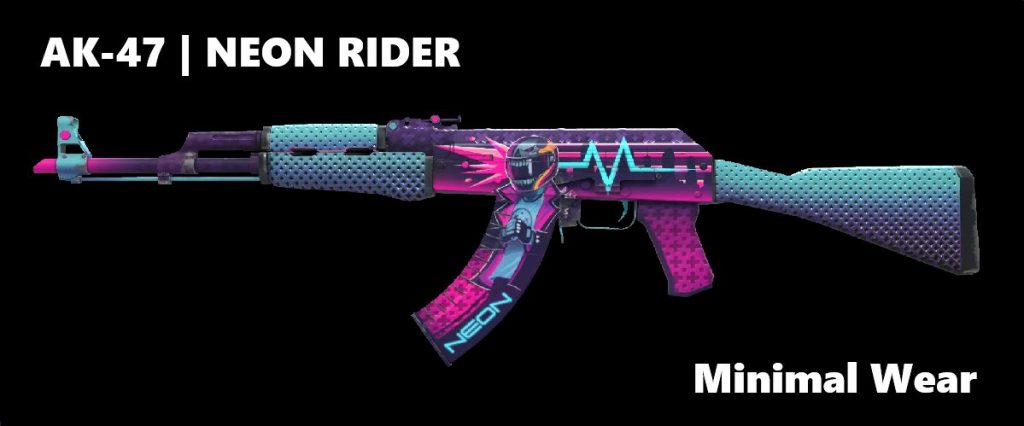
Minimal Wear covers floats from 0.07 to 0.15, but the lower end of that range is where the real value is.
Skins around 0.07–0.10 are often referred to as “FN–looking MW.” At that level, wear is extremely light and usually hard to notice unless you are inspecting the skin closely.
As the float gets closer to 0.15, wear becomes more visible. You might start to see small scratches or fading, depending on the skin. That is why two Minimal Wear skins can look quite different, even though they share the same label.
When Minimal Wear looks identical to Factory New (practical checkpoints)
In a lot of cases, Minimal Wear and Factory New look almost the same in actual gameplay.
You will usually see minimal difference when:
- The skin has a clean or simple design
- The finish does not highlight scratches easily
- Wear appears in less noticeable areas of the weapon
If you have to inspect the skin closely to spot the difference, it usually means the upgrade to Factory New is not giving you much in return.
A simple rule: if a low-float MW skin looks clean in screenshots and in-game previews, it will likely feel identical to FN during matches.
Minimal Wear trading considerations vs Factory New
Minimal Wear is not just about saving money upfront. It is also easier to work with when it comes to trading and resale.
Because MW sits in the middle:
- It has strong demand from regular players
- It is more affordable to buy and sell quickly
- You are not risking as much capital compared to Factory New
Factory New still holds more prestige and can perform better on high-end skins, but it also requires a bigger upfront investment. That limits the number of potential buyers.
Minimal Wear, especially low-float listings, tends to move faster in the market because it appeals to both players and value-focused traders.
For finish-related wear differences, see this guide on popular CS2 skin finishes.
Field-Tested in CS2: Budget-Friendly Wear Tier with Big Float Variation
Field-Tested is where prices drop the most, but it’s also the wear tier with the biggest difference between good and bad listings. Two Field-Tested skins can look completely different depending on the float, which is why this tier requires more attention when buying.
Done right, Field-Tested can give you a solid-looking skin for much less. Done wrong, it can look heavily worn.
Field-Tested float range and why “clean FT” matters
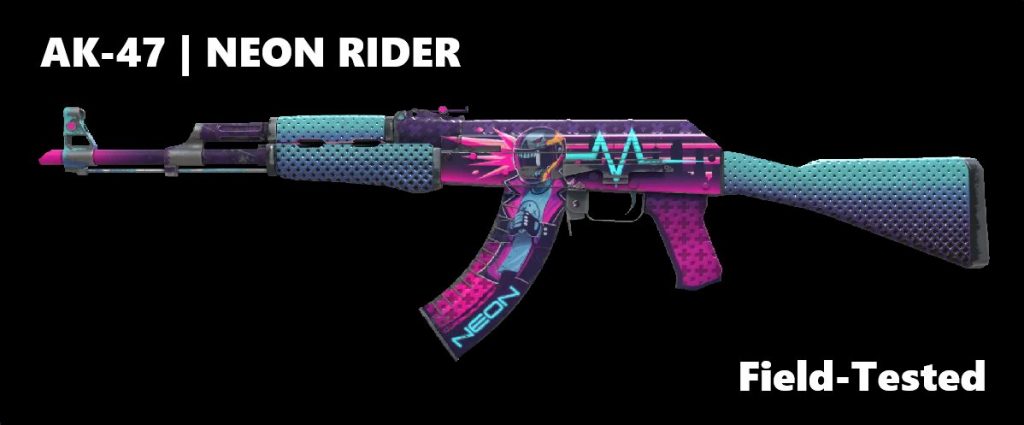
Field-Tested covers a wide float range from 0.15 to 0.38, and that range is where things get tricky.
The lower end of FT, around 0.15–0.20, is often called “clean Field-Tested.” These skins can still look surprisingly good, with only light wear that is not very noticeable in-game.
As the float increases, wear becomes much more obvious. That is why the difference inside FT matters more than in most other tiers. Buying FT without checking float is one of the most common mistakes.
What low-float Field-Tested looks like vs high-float Field-Tested
A low-float Field-Tested skin can look close to Minimal Wear, especially on finishes that hide wear well. You might see a few small scratches, but overall the skin still feels clean enough to use as a playskin.
A high-float Field-Tested skin is a different story. Scratches become larger, colors can look faded, and the overall finish starts to lose its appeal. On some skins, the difference is immediately noticeable, even without inspecting closely.
That gap is what makes FT so inconsistent. It can be a great deal or a poor buy depending entirely on the float.
Field-Tested red flags: finishes where FT wear is very noticeable
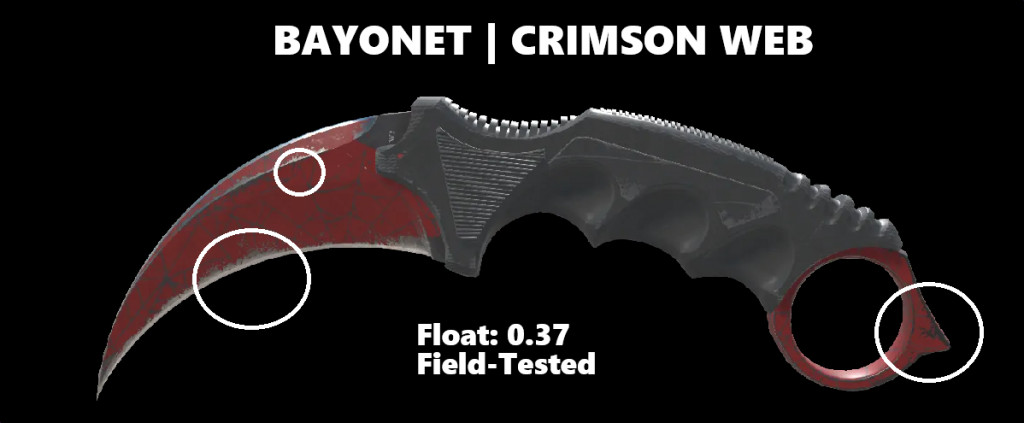
Not every skin works well in Field-Tested. Some finishes show wear much more aggressively and can look significantly worse once they enter the FT range.
Common red flags include:
- Bright, glossy finishes where scratches stand out
- Skins with large clean surfaces that show wear clearly
- Designs where fading or damage breaks the overall look
On these types of skins, Field-Tested often looks too worn, even at lower floats. In those cases, it usually makes more sense to move up to Minimal Wear.
Factory New vs Minimal Wear vs Field-Tested in CS2: Side-by-Side Comparison Checklist
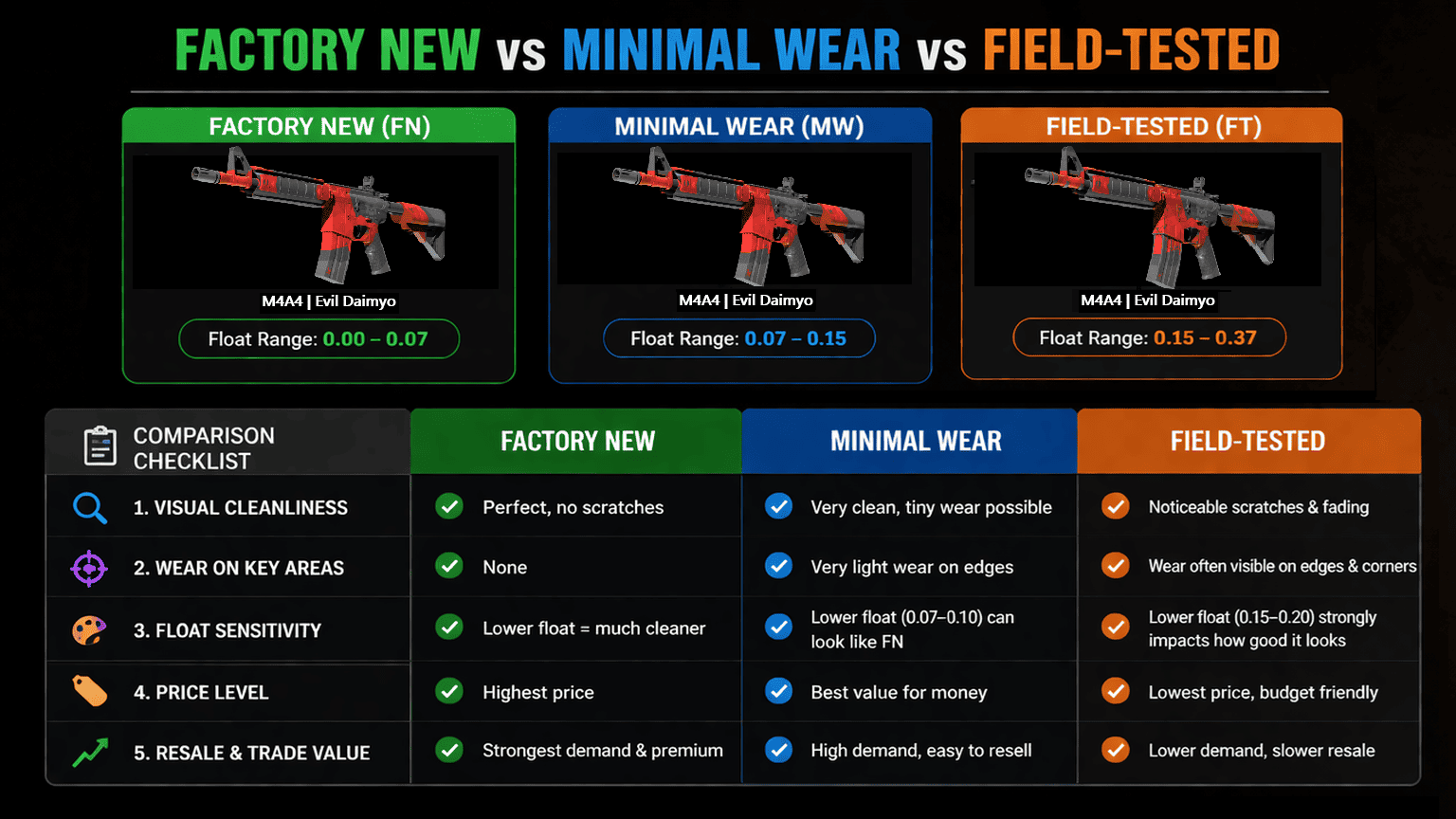
When you compare Factory New, Minimal Wear, and Field-Tested, the label alone is not enough. Two skins with the same wear tier can look completely different depending on float, finish, and where the wear appears.
A quick checklist can save you from overpaying or picking a worse-looking version.
CS2 inspect checklist: where to look for wear (edges, scratches, pattern hotspots)
When inspecting a skin, certain areas reveal wear much faster than others.
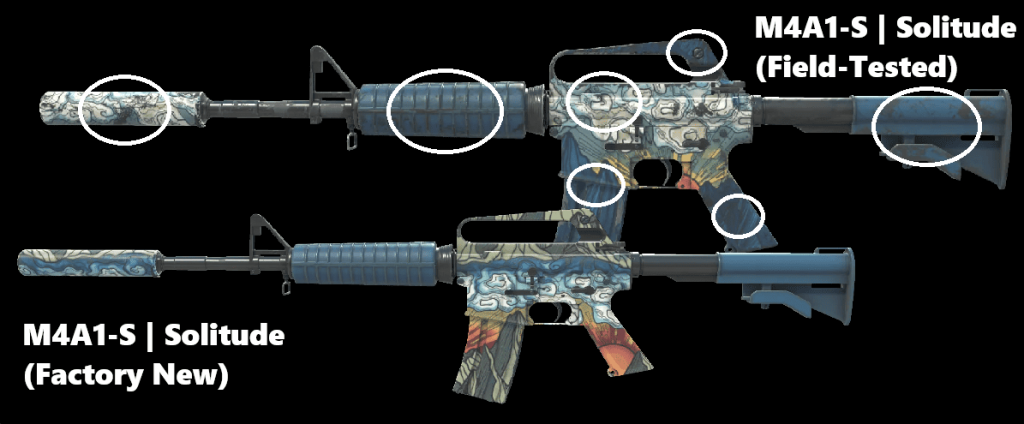
Focus on:
- Edges and corners – these are usually the first places where wear shows
- Center of the weapon – large flat areas make scratches easier to notice
- Pattern hotspots – some skins have specific spots where wear is more visible
If these areas look clean, the skin will usually look good overall. If they are heavily scratched, the wear will be noticeable in-game.
“Same wear tier, different look” checklist (finish-dependent wear)
Not all skins react to wear the same way. Pay attention to:
- Finish type – glossy and bright skins show wear more clearly
- Color and contrast – lighter colors highlight scratches more than darker ones
- Design complexity – busy patterns can hide wear better than clean designs
For example, a Field-Tested dark skin might still look solid, while a bright glossy skin in the same condition can look heavily worn.
“Buy by float, not label” rule for smarter purchases
The biggest rule in CS2 skin buying is simple: always check the float, not just the wear tier.
- A low-float Minimal Wear can look better than a high-float Factory New
- A low-float Field-Tested can look close to Minimal Wear
- A high-float version of any tier can look worse than expected
The wear label gives you a rough category, but the float tells you the real condition.
CS2 Buying Guide: Which Wear Tier to Choose Based on Your Goal
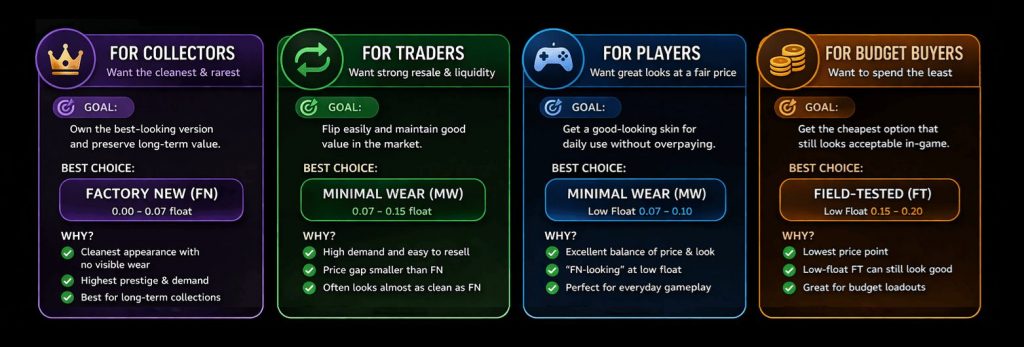
The “best” wear tier in CS2 depends on what you are trying to do. Collecting, trading, and building a skin loadout all lead to different choices.
Instead of defaulting to Factory New, it’s better to match the wear tier to your goal.
Best wear tier for collectors and long-term holders
For collecting and long-term value, Factory New is usually the top choice.
It has the highest demand for premium skins, looks the cleanest, and tends to hold value better over time. Low-float Factory New skins are especially desirable, which is why collectors often focus on them.
Minimal Wear can still work for certain skins, but Factory New is generally the safer option when the goal is long-term holding or showcasing high-end items.
Best wear tier for traders and liquidity
For trading, Minimal Wear is often the most practical tier.
It sits in the middle of the market:
- Affordable enough for a wide range of buyers
- Clean enough to stay desirable
- Easier to resell compared to expensive Factory New listings
Low-float Minimal Wear skins tend to move quickly because they appeal to both players and value-focused buyers. That makes them easier to flip without waiting too long.
Best wear tier for tight budgets (how to avoid ugly FT)
If you are working with a limited budget, Field-Tested is the go-to option, but only if you choose carefully.
The key is to avoid random FT listings and focus on:
- Low-float FT (around 0.15–0.20)
- Skins that hide wear well (darker or more complex designs)
Avoid high-float FT unless you are okay with visible wear. This is where most bad purchases happen, because the skin can look much worse than expected.
CS2 Float Basics: How to Check Float Value Before You Buy
Float value is one of the most important things to check before buying any CS2 skin. The wear label tells you the category, but the float tells you the actual condition inside that category. That is why two skins listed as Minimal Wear or Field-Tested can still look very different.
If you want to avoid overpaying, checking float should be part of every purchase.
How to check float on Steam/inspect links
The easiest way to check float is through the skin’s inspect link. On Steam Market and most third-party marketplaces, you can inspect the item and view its float value before buying.
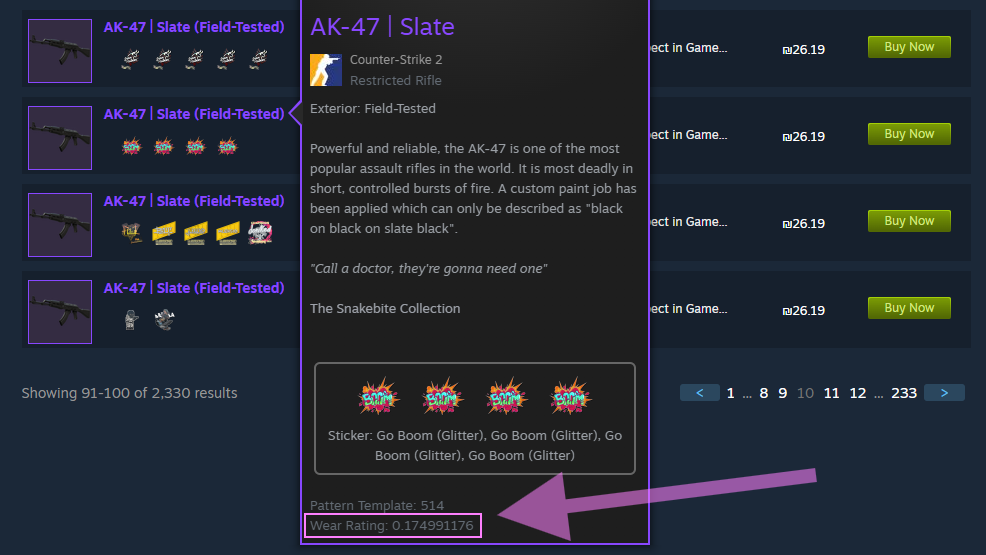
On marketplaces, the float is often shown directly in the listing, which makes things simple. On Steam, you may need to use the inspect view or copy the inspect link into a float-checking tool if the number is not displayed clearly.
The main point is simple: do not buy based only on the wear label. Always look for the exact float first.
Float target ranges to bookmark (FN/MW/FT “good floats”)
Not every float inside a wear tier is equally good. Some ranges are much safer buys than others.
A useful rule of thumb:
- Factory New: aim for 0.00 to 0.03 for the cleanest look
- Minimal Wear: aim for 0.07 to 0.10 for that near-FN value zone
- Field-Tested: aim for 0.15 to 0.20 for cleaner budget listings
These are not hard rules for every skin, but they are strong target ranges if you want better-looking listings inside each tier.
Common float traps: overpaying for FN or buying high-float FT accidentally
One of the most common mistakes is paying a big premium for Factory New without checking where the float sits inside FN. A 0.06 FN skin can still cost much more than Minimal Wear, even if the visual gap is small.
Another common mistake is buying Field-Tested without noticing the float is near the top of the range. A 0.34 FT skin can look much rougher than a 0.16 FT version, even though both have the same label.
That is why float matters so much. It helps you avoid expensive FN listings that do not look special and bad FT listings that look far worse than expected.
Common Mistakes When Choosing Factory New vs Minimal Wear vs Field-Tested in CS2
Most bad skin purchases in CS2 come from the same few mistakes. Players rely too much on the wear label, ignore float differences, or assume all skins behave the same.
Avoiding these mistakes is often the difference between getting a great deal and overpaying for something that doesn’t look as good as expected.
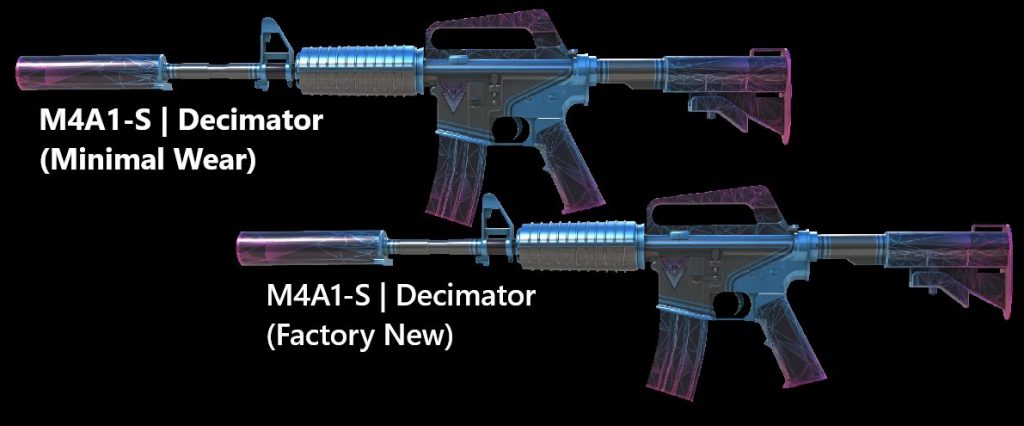
One of the most common mistakes is automatically going for Factory New.
In many skins, a low-float Minimal Wear version looks almost identical to Factory New in-game. The difference is often only visible when inspecting closely, yet the price gap can be significant.
This leads to overpaying for the FN label without getting a meaningful visual upgrade. Checking a low-float MW option first is usually the smarter move.
Ignoring FT float spread (clean FT vs rough FT)
Field-Tested has the widest float range, and ignoring that can lead to poor purchases.
A clean FT (around 0.15–0.20) can look solid and offer great value. A high-float FT (0.30+) can look heavily worn, even though both are listed under the same tier.
Buying FT without checking the float is one of the fastest ways to end up with a skin that looks worse than expected.
Forgetting skin-specific wear behavior and float caps
Not all skins wear the same way, and not all skins use the full float range.
Some finishes hide wear well and look good even at higher floats. Others show scratches very early and need lower floats to look clean. On top of that, certain skins have float caps, meaning they can never reach full 0.00 or 1.00 ranges.
Ignoring these details can lead to wrong assumptions, like expecting a skin to look clean in Minimal Wear when that specific finish does not handle wear well.
FAQ: Factory New vs Minimal Wear vs Field-Tested in CS2
Does a CS2 skin get worse with use over time?
No. A CS2 skin does not wear down from use.
Its condition is fixed the moment the item is generated. That means a Factory New skin will not slowly turn into Minimal Wear, and a Field-Tested skin will not get worse after matches. The float value stays the same unless you trade for a different item.
Can Minimal Wear ever look better than Factory New?
Not in the literal sense, since Factory New is still the cleaner wear tier. But in practice, a low-float Minimal Wear skin can look so close to Factory New that most players will not notice a difference in-game.
That is why many buyers choose low-float MW instead of paying extra for FN. The skin is not technically better, but it can offer much better value while looking nearly the same.
Is Field-Tested always “bad-looking”?
No. Field-Tested is not automatically ugly.
A low-float Field-Tested skin can still look clean, especially on finishes that hide wear well. The problem is that FT has a wide float range, so there is a big difference between a clean FT and a rough one.
That is why some Field-Tested skins look great for the price, while others look heavily worn.
What float should I aim for in Minimal Wear and Field-Tested?
For Minimal Wear, a good target is usually 0.07 to 0.10. That is the part of the range where many skins still look very close to Factory New.
For Field-Tested, a strong target is usually 0.15 to 0.20. That is often the safest area if you want a cheaper skin that still looks decent.
These are not perfect rules for every skin, but they are strong starting points for smarter purchases.
