


Counter-Strike 2 Workshop maps are still one of the best ways to improve your gameplay in 2026. With custom CS2 maps from the Steam Workshop, players can train aim, practice recoil control, warm up before Premier, improve movement, test crosshair settings, inspect skins, or play quick 1v1 and 2v2 games with friends.
In this guide, we’ve collected the best CS2 Workshop maps in 2026, including aim training maps, recoil training maps, movement practice maps, warmup maps, crosshair generators, viewmodel generators, skin inspection maps, and fun custom maps. Each map was chosen based on usefulness, features, CS2 compatibility, community popularity, and overall value for practice or customization.
Before buying any CS2 skin, check the latest prices and available offers in the BLIX CS2 Skins Database, since market listings and skin values can change quickly.
Contents
- 1 Top CS2 Workshop Maps in 2026 for Training Aim, Recoil, Movement, and Warmup
- 2 Aim Botz – Training
- 3 Recoil Master – Spray Training (CS2)
- 4 Fast Warmup — Bot Training
- 5 FAST AIM/REFLEX TRAINING [CS2]
- 6 Movement Hub
- 7 DHL A Sites CT Defense Training Map
- 8 Shortdust
- 9 crashz’ Viewmodel Generator CS2
- 10 crashz’ Crosshair Generator v4
- 11 Inspect Skins
- 12 Fun CS2 Workshop Maps to Play With Friends in 2026
- 13 surf_utopia_njv
- 14 Let’s Climb! IEM Chengdu
- 15 bhop_malabar5
- 16 Only Up!
- 17 How to Download and Play CS2 Workshop Maps via Steam
- 18 Common CS2 Workshop Map Issues and Quick Fixes
- 19 Final Thoughts: Which CS2 Workshop Maps Are Best in 2026
- 20 CS2 Workshop Maps FAQ: Download, Compatibility, and Playing With Friends in 2026
- 21 Are CS2 Workshop maps free?
- 22 What are the best CS2 Workshop maps for practice in 2026?
- 23 How do I play Workshop maps in CS2?
- 24 Can I play CS2 Workshop maps with friends?
- 25 Why are some Workshop maps not working in CS2?
Top CS2 Workshop Maps in 2026 for Training Aim, Recoil, Movement, and Warmup
We selected and ranked these CS2 Workshop maps based on practical training value, CS2 compatibility in 2026, features, community popularity, and how quickly they deliver results in a typical warmup session.
- Aim Botz – Training (Aim training / bot practice): Warmups, headshot practice, flicks, and raw aim
- Recoil Master – Spray Training (Recoil training): AK-47, M4A4, M4A1-S, and rifle spray control
- Fast Warmup — Bot Training (Aim warmup / training): Quick pre-match warmups, flicks, peeking duels, and aim consistency
- FAST AIM/REFLEX TRAINING (Aim / reflex training): Reaction speed, target switching, tracking, and fast warmups
- Movement Hub (Movement training / time trial): Jump timing, strafing, route practice, and movement consistency
- DHL A Sites CT Defense Training Map (CT site defense / tactical training): Anchoring A sites, crosshair placement, utility timing, and decision-making
- ShortDust (Small map / Wingman-style combat): 1v1s, 2v2s, quick peeks, close-range duels, and casual fights
- crashz’ Viewmodel Generator CS2 (Viewmodel customization / settings utility): Testing viewmodel settings, copying commands, and setting up an autoexec
- crashz’ Crosshair Generator v4 (Crosshair customization / settings utility): Creating, testing, and saving custom CS2 crosshair settings
- Inspect Skins (Skin inspection / screenshot utility): Skin screenshots, sticker previews, float checks, and content creation
- surf_utopia_njv (Surf / movement map): Learning surf basics, air strafing, ramp control, and relaxed movement practice
- Let’s Climb! IEM Chengdu (Climb / movement challenge): Jump timing, casual climbing challenges, and fun sessions with friends
- bhop_malabar5 (Bhop / movement map): Bunnyhop practice, speed control, air strafing, and community server challenges
- Only Up! (Climb / movement challenge): Vertical climbing, air control, patience, and casual custom map fun
Aim Botz – Training
- Map Type: aim training / bot practice
- Why It’s Great: offers customizable bot setups for practicing headshots, flicks, sprays, and target switching.
- Best For: warmups, raw aim practice, headshot accuracy, and reaction training.
- Steam Workshop: Aim Botz – Training (CS:GO) (CS2? Description)
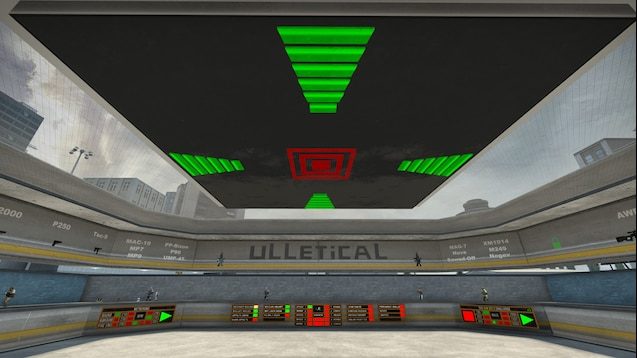
Aim Botz (CS2) is one of the most-used Workshop maps for building raw aim. It revolves around a highly customizable bot arena where you can switch between static/moving targets, toggle armor and helmets, use peek walls, and drill headshots from multiple angles.
Recoil Master – Spray Training (CS2)
- Map Type: recoil training
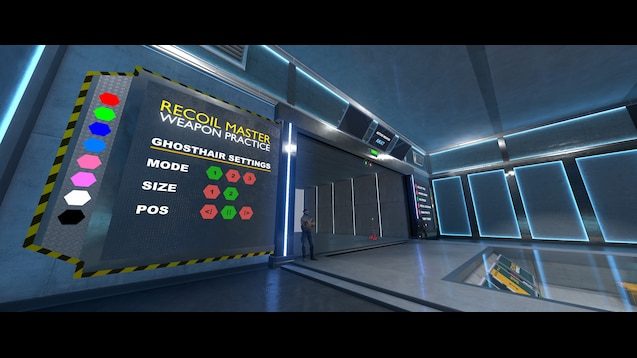
- Why It’s Great: uses ghosthair guides to teach CS2 spray patterns and recoil control.
- Best For: practicing AK-47, M4A4, M4A1-S, and other rifle sprays.
- Steam Workshop: Recoil Master – Spray Training (CS2)
This map is built around a spray-pattern guide: choose a weapon, spray at a wall or a target, and trace the on-screen recoil path to keep your bullets tight. Since every gun has a different pattern, consistent practice here translates directly into cleaner sprays and more reliable kills in real fights.
Fast Warmup — Bot Training
- Map Type: aim warmup / training
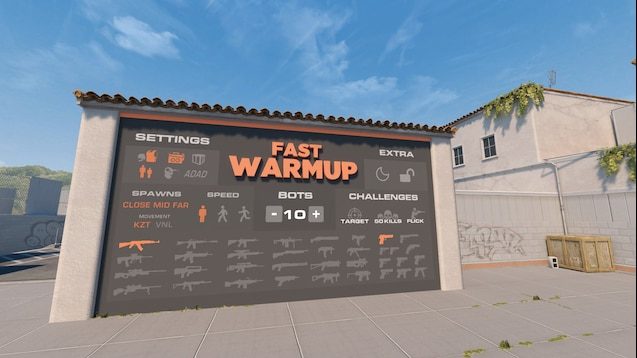
- Why It’s Great: offers static bots, peeking bots, AWP flick practice, spray training, and a 50-kill challenge in one map.
- Best For: quick pre-match warmups, flick practice, peeking duels, and general aim consistency.
- Steam Workshop: Fast Warmup — Bot Training
The main feature is its mix of peeking bots and static bots. The spawn area has bots that peek you to simulate more realistic fights, while the back area offers classic static-bot aim training. It also includes weapon selection, knife selection, bot settings, AWP flick mode, spray/recoil training, target practice, pro player crosshairs, a KZ course, and a 50-kill challenge.
FAST AIM/REFLEX TRAINING [CS2]
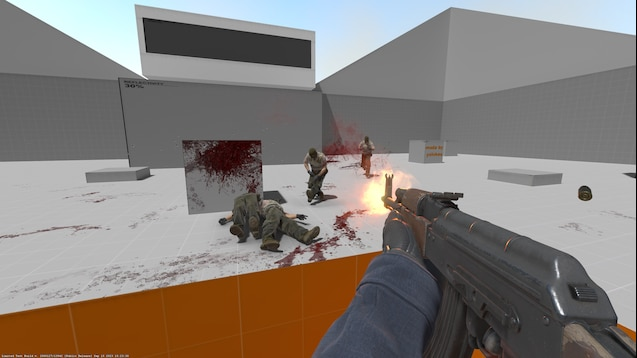
- Map Type: aim / reflex training
- Why It’s Great: spawns moving bots around you to improve flicks, reaction speed, and target switching.
- Best For: fast warmups, headshot practice, reflexes, and tracking moving enemies.
- Steam Workshop: FAST AIM/REFLEX TRAINING [CS2]
A wave-based arena spawns moving bots around you from multiple angles, forcing faster reactions, cleaner flicks, and better target switching under pressure. You can ramp difficulty up or down by changing the bot count (for example, bot_quota 6).
Movement Hub
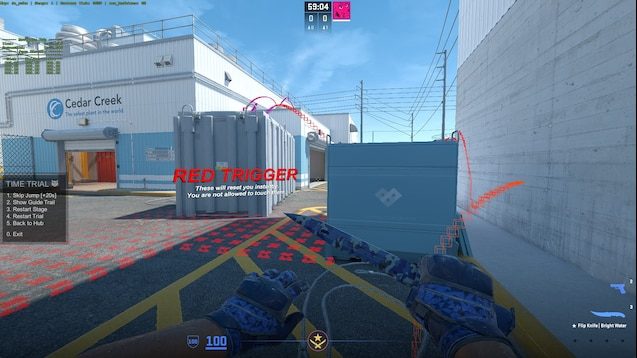
- Map Type: movement training / time trial
- Why It’s Great: lets players practice jumps, strafing, routes, and movement challenges from official CS2 maps
- Best For: improving movement consistency, jump timing, strafing, and map-specific routes
- Steam Workshop: Movement Hub
A structured time-trial mode turns movement practice into repeatable runs, so you can drill jump timing, strafes, and routes with clear feedback. It’s a more efficient way to lock in map-specific movement spots than trying to practice them randomly in matchmaking.
DHL A Sites CT Defense Training Map
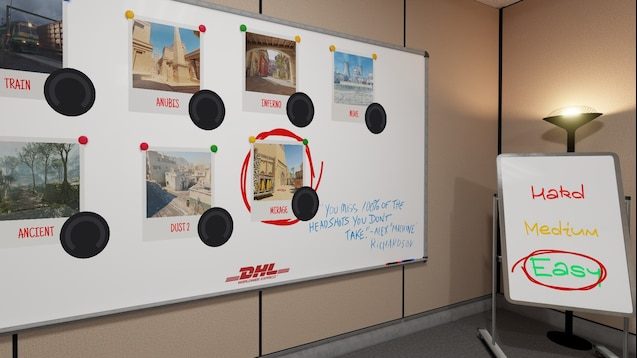
- Map Type: CT site defense / tactical training
- Why It’s Great: uses wave-based bot pushes to practice holding A sites under pressure
- Best For: CT anchoring, crosshair placement, utility timing, and site-hold decision-making
- Steam Workshop: DHL A Sites CT Defense Training Map – Hold A Better
A wave-based A-site hold simulator that repeatedly sends bot pushes at your position, forcing you to anchor under pressure instead of taking random duels. It sharpens crosshair placement, utility timing, positioning, and decision-making by making you survive (and adapt to) multiple attacks in a row.
Shortdust
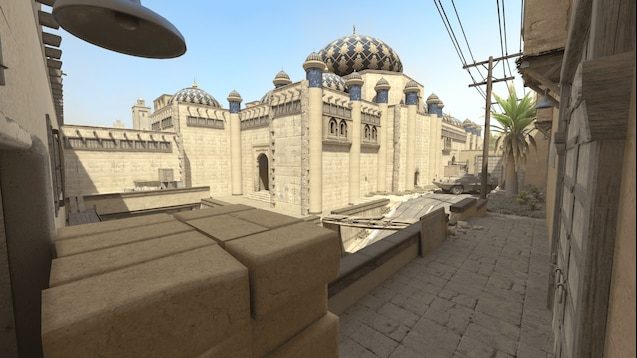
- Map Type: small map / Wingman-style combat
- Why It’s Great: offers fast rounds, tight angles, and Dust-style fights in a compact layout
- Best For: 1v1s, 2v2s, quick peeks, close-range duels, and aim warmups
- Steam Workshop: ShortDust
ShortDust is a CS2 Workshop remake of the classic CS:GO Shortdust map. It is a smaller Dust-style map built around fast rounds, simple routes, and close-to-mid-range fights. It’s just a great map to play with your friends.
crashz’ Viewmodel Generator CS2
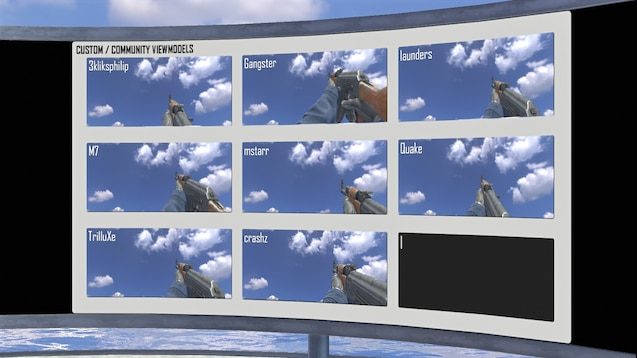
- Map Type: viewmodel customization / settings utility
- Why It’s Great: lets players adjust and preview viewmodel settings instantly without manually testing console commands
- Best For: finding a cleaner weapon position, copying viewmodel commands, and setting up an autoexec
- Steam Workshop: crashz’ Viewmodel Generator CS2
A real-time viewmodel sandbox that lets you tweak weapon position in-game and instantly see what changes, instead of guessing commands and restarting. Once it looks right, you can copy the generated console lines for your autoexec, plus browse community presets and use the built-in skin screenshot area.
crashz’ Crosshair Generator v4
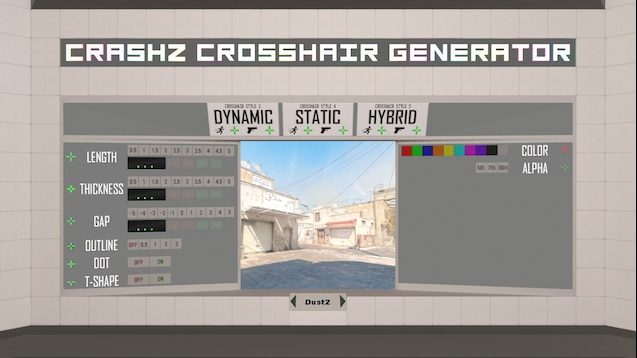
- Map Type: crosshair customization / settings utility
- Why It’s Great: lets players create, preview, test, and copy custom crosshair settings in-game.
- Best For: finding a clear crosshair, testing pro presets, and saving crosshair commands.
- Steam Workshop: crashz’ Crosshair Generator v4
A real-time crosshair editor that lets you build a setup in seconds, test it immediately, and copy the exact command without guesswork. You can tweak size, gap, thickness, color, outline, dot, and style, then compare against pro/community presets and save the final settings with ready-to-use console lines.
Inspect Skins
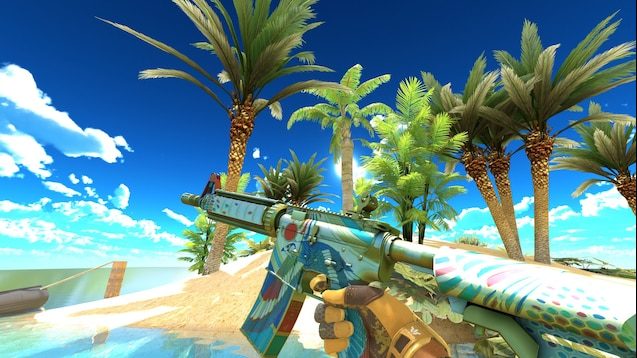
- Map Type: skin inspection / screenshot utility
- Why It’s Great: provides clean lighting and simple spaces for inspecting skins, stickers, knives, and gloves.
- Best For: skin screenshots, trading previews, float checks, sticker placement, and content creation.
- Steam Workshop: Inspect Skins
A clean skin showcase map built for inspection and screenshots rather than gameplay, with simple lighting and uncluttered spaces that make finishes, stickers, knives, and gloves easy to judge. To preview specific combos, you create a loadout on the creator’s site and import it into the game.
To preview finishes, stickers, and float details before you trade or buy, use How to Inspect CS2 In-Game Skins for the exact inspect commands and in-match methods.
Fun CS2 Workshop Maps to Play With Friends in 2026
Fun CS2 Workshop maps are best when your goal is casual gameplay with friends (1v1, 2v2, surf, bhop, and climb-style challenges) instead of strict aim or recoil practice. In this section, you’ll find the best CS2 fun maps in 2026 for quick lobbies, relaxed movement sessions, and “just one more run” custom challenges.
surf_utopia_njv
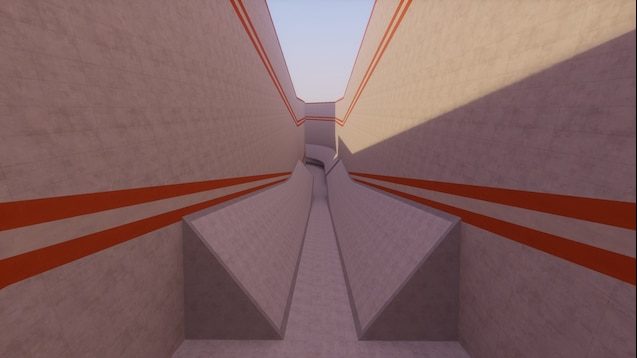
- Map Type: surf / movement map
- Why It’s Great: offers a smooth, beginner-friendly linear surf route with clean ramps and simple progression
- Best For: learning CS2 surf basics, practicing air strafing, improving movement control, and relaxed surf sessions
- Steam Workshop: surf_utopia_njv
surf_utopia_njv is one of the most popular classic surf maps available for CS2. It is a Tier 1 linear surf map, making it a good choice for beginners who want to learn how surfing works without dealing with overly difficult ramps or complex routes. The map focuses on smooth transitions, clean movement, and consistent speed control, helping players practice air strafing and ramp positioning in a simple, flowing layout.
Let’s Climb! IEM Chengdu
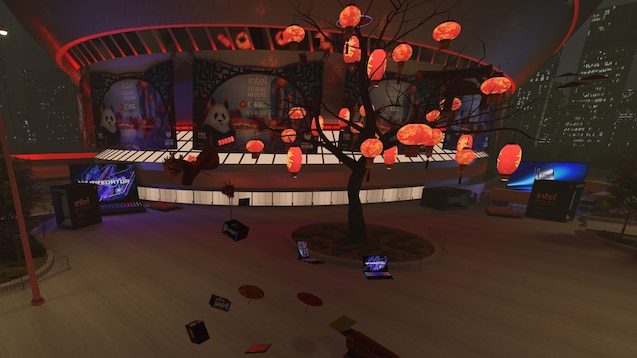
- Map Type: climb / movement challenge
- Why It’s Great: turns CS2 movement into a vertical “Only Up” obstacle course inspired by the IEM Chengdu venue
- Best For: casual movement practice, jump timing, climbing challenges, bhop-style practice, and fun sessions with friends
- Steam Workshop: Let’s Climb! IEM Chengdu
Let’s Climb! IEM Chengdu is a CS2 Workshop movement map built around an “Only Up” climb challenge concept. Instead of aim training or recoil practice, the goal is to climb higher and higher through a custom obstacle course set outside the Chengdu Financial City Performance Center, the venue connected to IEM Chengdu.
bhop_malabar5
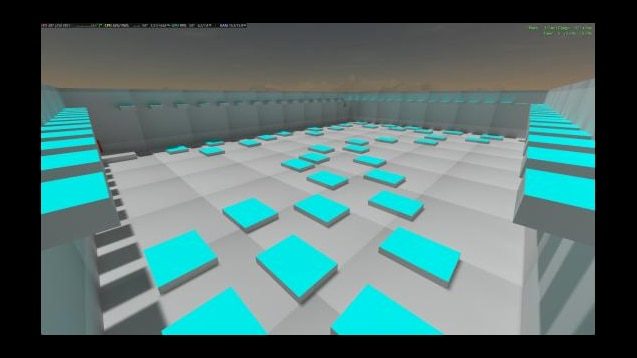
- Map Type: bhop / movement map
- Why It’s Great: gives players a dedicated bunnyhop route for practicing speed, jump timing, strafing, and smooth movement
- Best For: bhop practice, air strafing, movement control, speed runs, and community server challenges
- Steam Workshop: bhop_malabar5
bhop_malabar5 is a CS2 bunnyhop map focused on movement, speed control, and clean jump timing. It fits best in your article as a bhop / movement practice map, especially for players who want something different from aim trainers and recoil maps.
Only Up!
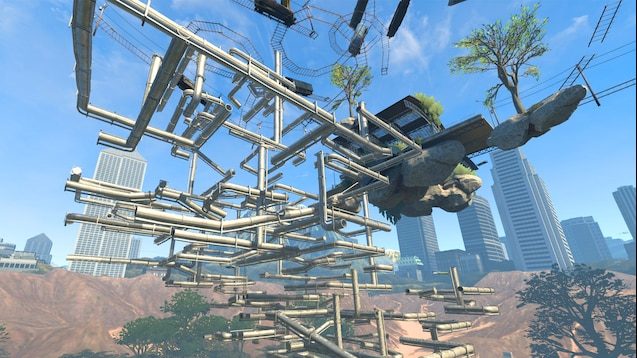
- Map Type: climb / movement challenge
- Why It’s Great: turns CS2 movement into a vertical climbing course with jumps, platforms, secrets, and a fun “reach the top” objective
- Best For: casual movement practice, jump timing, air control, patience, and fun challenges with friends
- Steam Workshop: Only Up!
Instead of fighting bots or practicing spray patterns, players climb through a vertical obstacle course where the goal is simple: keep going higher without falling. The Workshop description presents it as a Source 2 remake where players explore a huge world, find secrets, and try to reach the top.
How to Download and Play CS2 Workshop Maps via Steam
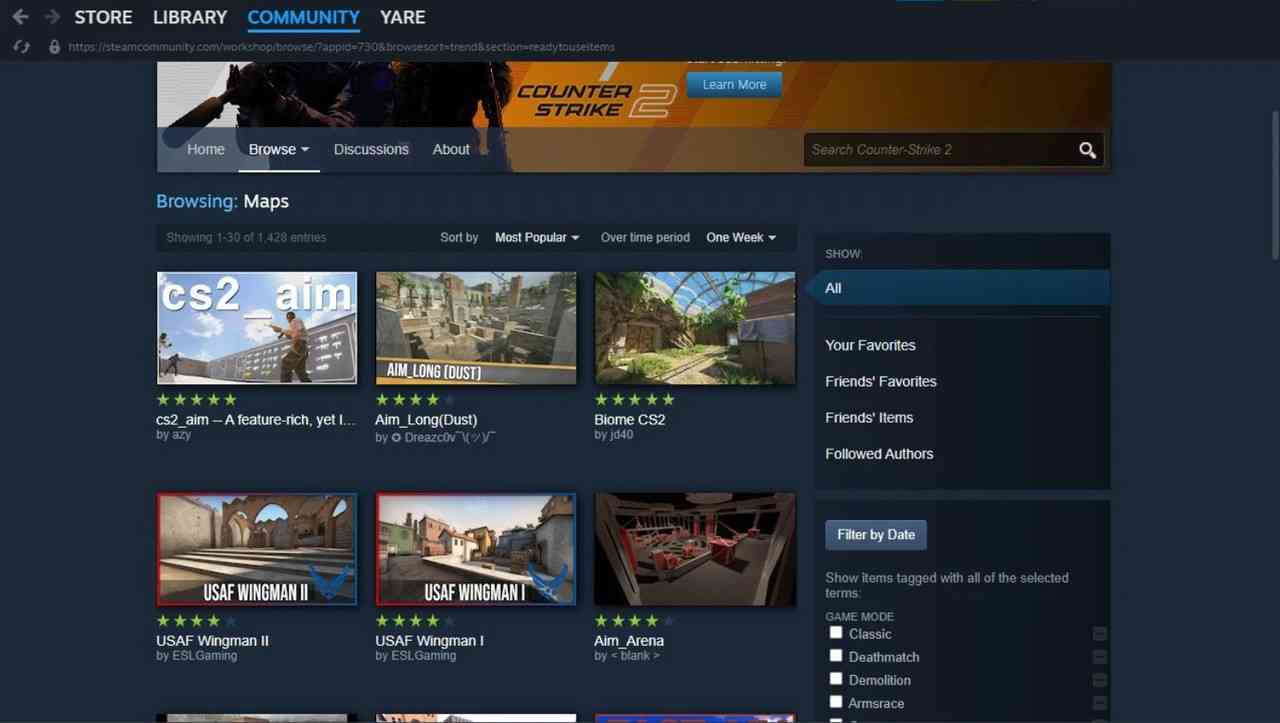
The Steam Workshop feature has been added to the Steam client to allow players to modify the game easily. Gamers can upload several different projects to the Steam Workshop, including custom weapon skins, various mods, and, most importantly, CS2 Workshop maps.
While players can modify various aspects of the game, the Workshop feature was designed to give gamers an easy way to access player-created CS2 Workshop content, which has also been integrated with the Steam client. Downloading the new CS2 Workshop map is simple and can be done from your Steam client level. All you need to do is:
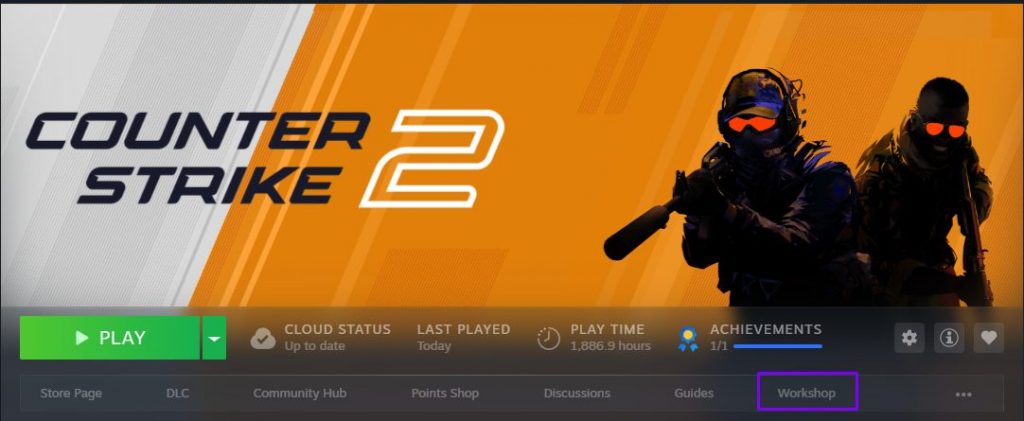
- Open your Steam Library
- Click on Counter–Strike 2
- Hit the “Workshop” tab
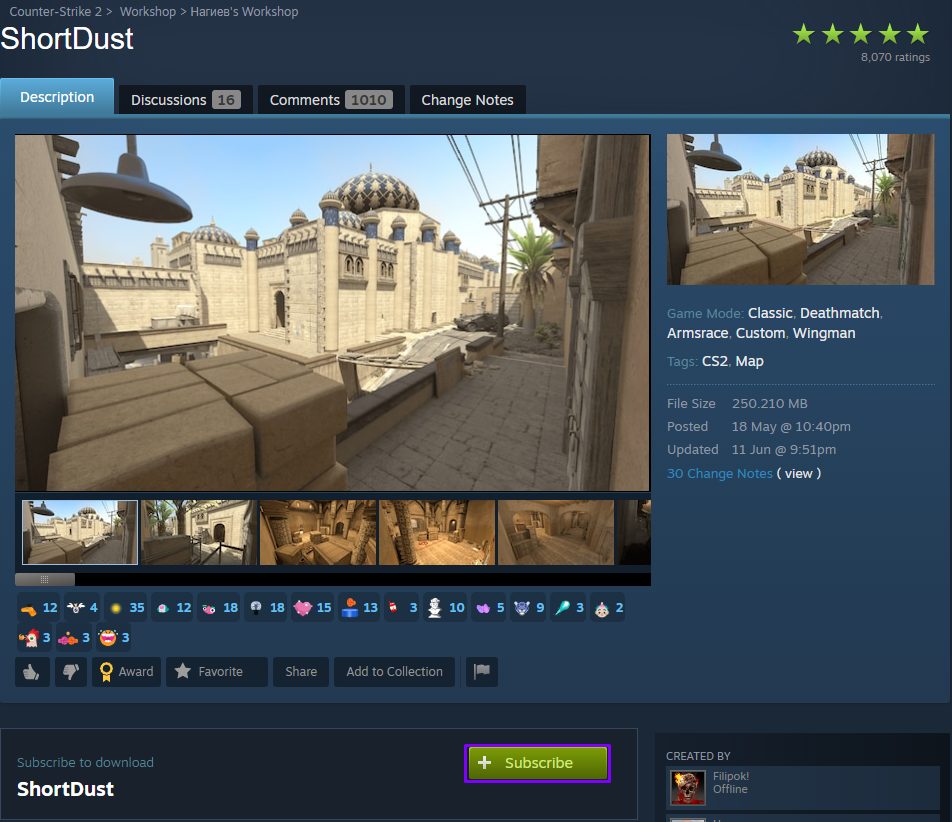
- Search and click Subscribe on your desired map

- Launch CS2, select Play > Workshop Maps > “Map Name” > GO
Common CS2 Workshop Map Issues and Quick Fixes
Workshop maps are great for practice, but they can glitch out in CS2 — so here are the most common problems players hit and the fastest fixes that usually work.
- Subscribed, but the map doesn’t show up in CS2
- Close CS2 and open it again (sometimes you need to restart Steam too).
- In Steam, double-check you’re actually subscribed and the download finished (look at the Downloads page).
- The map loads to a black screen, freezes, or crashes
- Unsubscribe from the map, restart CS2, then subscribe again (this often fixes a broken download).
- In Steam, run Verify integrity of game files (it fixes missing/corrupted files).
- If you use lots of launch options or heavy configs, try starting the game “clean” and test again.
- Textures are missing, lighting looks broken, or you clip through stuff
- Usually this means it’s an old CS:GO map or a messy Source 2 conversion.
- Fix: choose a CS2/Source 2 version of the map, ideally one with recent updates and active comments.
- Workshop download is stuck or keeps downloading again
- Clear Steam’s download cache, restart Steam, then resubscribe.
- Make sure you have enough free disk space — Workshop maps can be bigger than they look.
Final Thoughts: Which CS2 Workshop Maps Are Best in 2026
CS2 Workshop maps are still a great way to practice, customize, and have fun in 2026. Aim trainers, recoil maps, movement courses, surf maps, bhop maps, and climb challenges all help players improve outside regular matchmaking.
The best map depends on your goal. Use Aim Botz or Fast Warmup for aim, Recoil Master for spray control, Movement Hub and surf_utopia_njv for movement, and Only Up! or Let’s Climb! IEM Chengdu for casual custom map fun.
Try a few different maps, build a short practice routine, and keep the ones that help you improve consistently.
CS2 Workshop Maps FAQ: Download, Compatibility, and Playing With Friends in 2026
Are CS2 Workshop maps free?
Yes, CS2 Workshop maps are free to download through the Steam Workshop. You only need to open Counter-Strike 2 in your Steam Library, go to the Workshop tab, find the map you want, and subscribe to it.
What are the best CS2 Workshop maps for practice in 2026?
The best CS2 Workshop maps for practice depend on your goal. Aim Botz and Fast Warmup are great for aim training, Recoil Master is best for spray control, and Movement Hub, surf_utopia_njv, and bhop_malabar5 are useful for movement practice.
How do I play Workshop maps in CS2?
Subscribe to a map on the Steam Workshop, launch CS2, then go to Play > Workshop Maps and select the map you downloaded. If the map does not appear, restart the game or check that the map is compatible with CS2.
Can I play CS2 Workshop maps with friends?
Yes, many CS2 Workshop maps can be played with friends, especially 1v1, 2v2, surf, bhop, and fun custom maps. Maps like ShortDust, Only Up!, and Let’s Climb! IEM Chengdu are good options for casual sessions.
Why are some Workshop maps not working in CS2?
Some older CS:GO Workshop maps may not work properly in CS2 because they were not updated for Source 2. For the best experience in 2026, choose maps that are marked as CS2-compatible and check recent Workshop comments before subscribing.
